
Desktop app · Windows, Mac, Linux
Invoices+
Invoicing and books that live on your computer. Not ours.
Invoices+ is local-only invoicing and bookkeeping for small business. Invoices and estimates, payments, expenses, Sales Hub, Income Hub, sales tax and a real P&L, running on Windows, Mac and Linux with zero cloud. You own your data, because it never leaves your machines.
Local-only, zero cloud. Protected by Tamper Shield Technology.

What is Invoices+?
Invoices+ is a desktop invoicing and accounting app for small businesses that would rather not rent their own books back from a cloud company. It handles invoices, estimates, recurring billing, payments, expenses, sales tax, the money that never had an invoice, and the reports your accountant asks for.
Everything stays on your own computers, encrypted. There is no cloud account. The app only contacts the license server to check your license and updates.
Local only
Zero cloud. Your data. Your computers.
Your books are the most sensitive file you own. They shouldn’t be sitting on somebody else’s server waiting for the next breach notice.
Invoices+ runs on Windows, Mac and Linux and keeps every record on your own computers. No cloud account, no syncing your business to a vendor, no subscription to see your own numbers. Your business data isn’t sent to TechingAPPS.
- Local only: there is no cloud account.
- Runs on Windows, Mac (signed and notarized by Apple) and Linux.
- You own your data. All data, attachments and backups are encrypted (AES-256-GCM).
- Protected by Tamper Shield Technology.
The favorites
Sales Hub, Expenses and Income Hub
Invoices are the easy part. The money that moves without an invoice is where most small-business books fall apart. These three fix that.
-
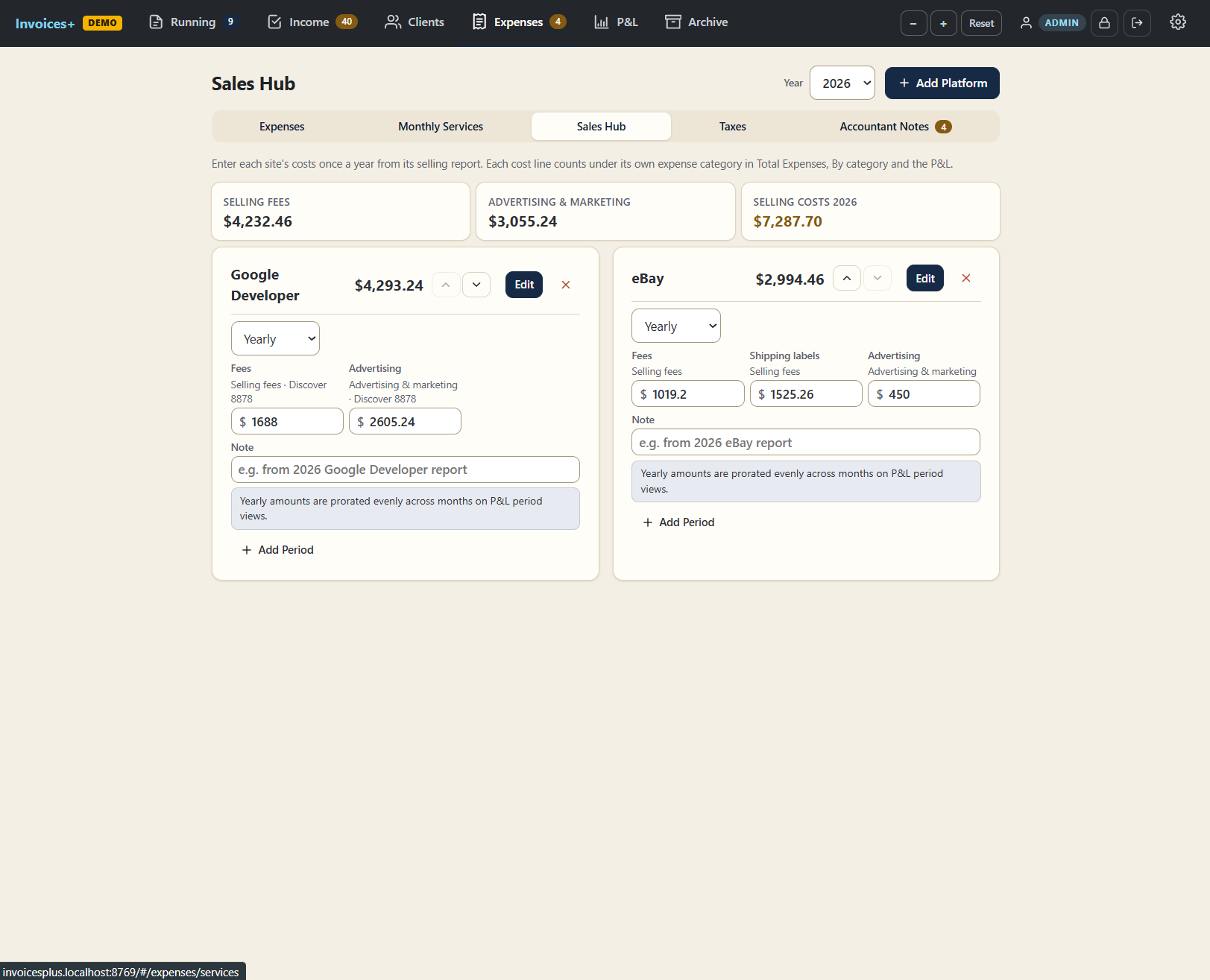
Track what each selling platform costs you, from fees and shipping to ads, by year, quarter, month or custom period. Each platform shows on your P&L. Sales Hub
Track what each selling platform costs you (eBay, Reverb and others) with up to 5 named cost lines like fees, shipping, ads and taxes. Each line has its own category and account. Amounts can be yearly, quarterly, monthly or a custom date range, and a platform can have more than one period in a year. Totals show as their own box on the P&L.
-
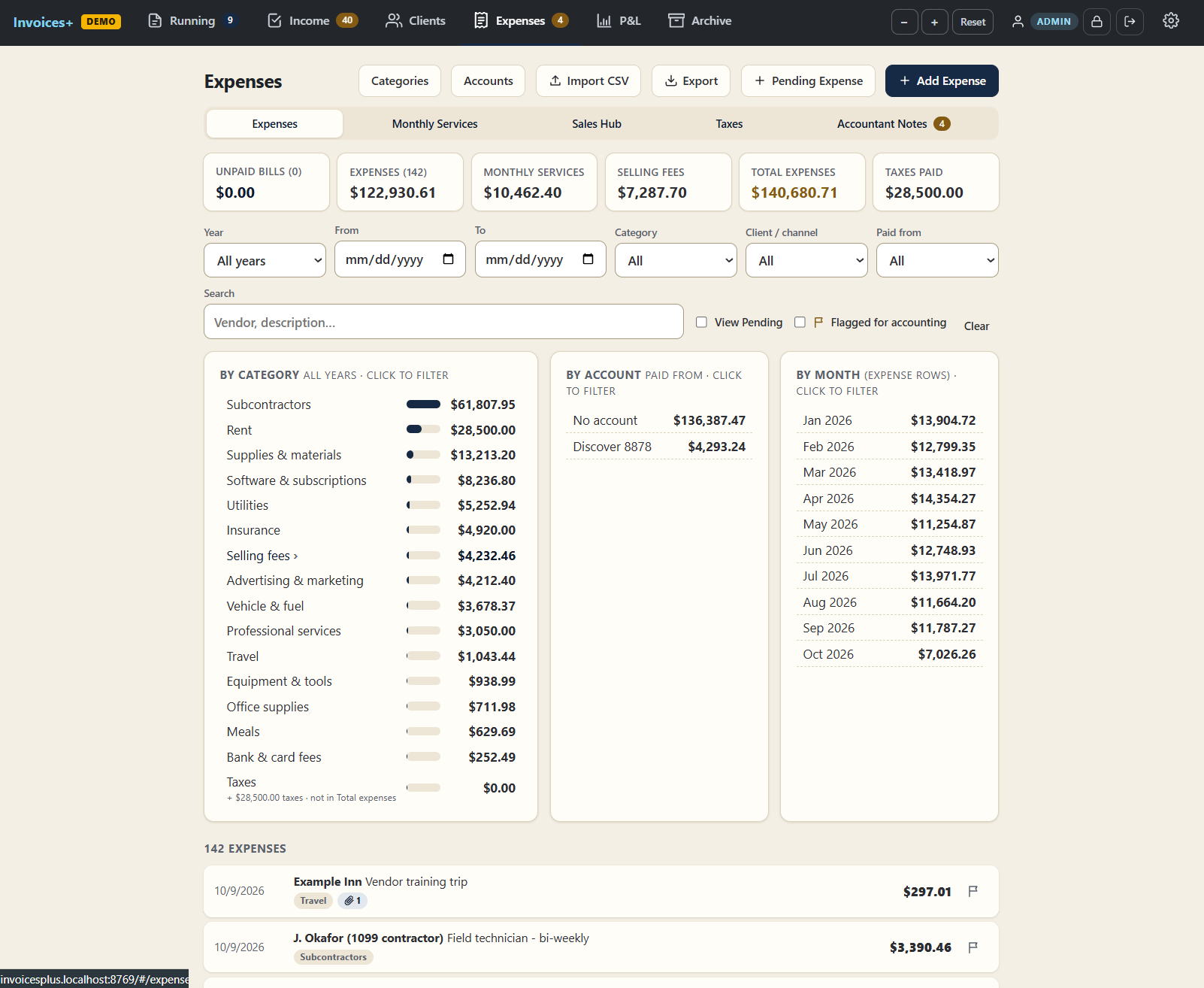
Every expense with its vendor, category and the account it was paid from, plus clickable By category, By month and By account summaries. Track bills you still owe and import bank statements from CSV. Expenses
Every expense with vendor, category, client or channel, “Paid from” account, description and attachments. Category groups with subtotals, clickable By category, By month and By account summaries, Pending Expenses for bills you still owe, and CSV import for bank and card statements with duplicate detection and undo.
-
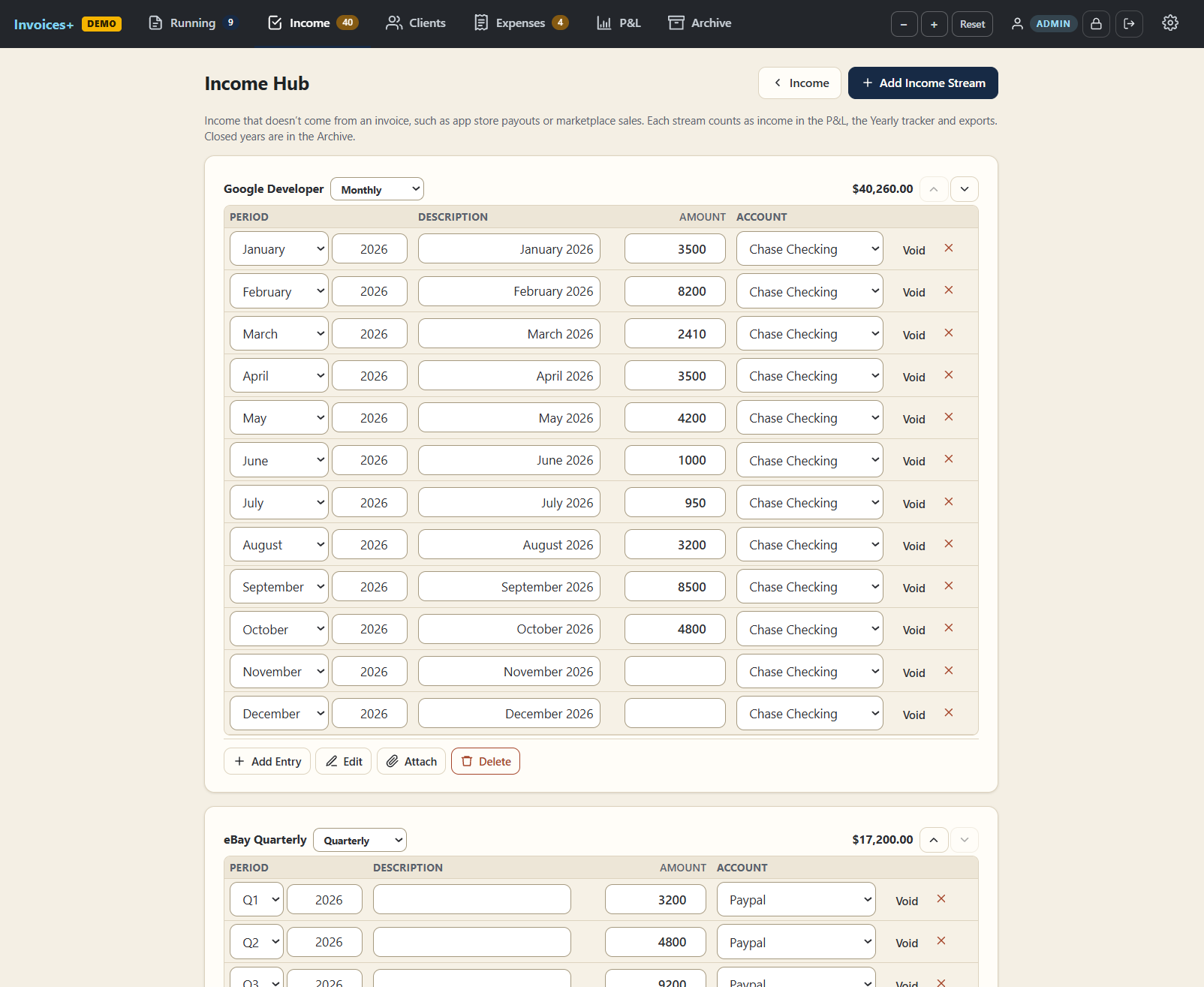
Record income that doesn’t come from an invoice, like app stores, marketplaces or royalties, by stream and period. It flows straight into your P&L and yearly reports. Income Hub
Record income that never had an invoice: app stores, Etsy, eBay, royalties. Each stream can be yearly, quarterly, monthly or custom, with date, description, amount, deposit account and attachments. It counts in the P&L, the Yearly tracker and exports.


Platform Migration
Leave your old system without retyping your life
Moving your books is usually the reason people stay stuck. Platform Migration exists so you don’t have to.
Settings › Platform Migration gives you ready-made templates for every record type, 12 in all, using the app’s own columns. Build your CSV imports easily from QuickBooks, a spreadsheet or another program, and import them one at a time, in as many sittings as you like.
- 12 ready-made templates: Chart of Accounts, Expense Categories, Clients, Invoices, Payments Received, Expenses (including pending bills), Monthly Services, Selling Fees, Tax Payments, Income Entries, Opening Balances and Journal Entries.
- Many QuickBooks and Shopify column names are matched for you, and you can change which file column goes to which field.
- Every file is checked before anything is saved, with Download Problem Rows and Copy AI Fix Prompt.
- A backup is made first, before each import, and one-click Undo restores it.
- Rows already in the app are skipped.
- Afterward it walks you through invoice numbering, the Journal and closing old years.

Invoicing
Invoices and estimates
-
Running invoices
Draft invoices with line items for Labor, Flat fee, Products, Services and Bundles. A PDF is made when you need it: preview it, print it or download it.
-
Close out and back again
Close out an invoice to move it to Income. A closed invoice with no payments can go “Back to Running” and keeps its number. Duplicate, void and un-void, and Admin deletes need a typed reason that’s logged.
-
Estimates
Their own E- numbers, ESTIMATE printed on the PDF, left out of totals, and one-click convert to an invoice.
-
Recurring invoices
Weekly up to yearly, with start and end dates and the billing period in the title. Made as a draft or closed out automatically, and missed ones are caught up.
-
Numbering and sales tax
Sequential or Patterned numbering (a prefix for each client) with 3–5 digits. Per-client sales tax defaults, a checkbox on each invoice and a setting on each line, reported apart from income.
-
Email invoices from the app
Invoices and estimates go out as PDF attachments from your own email account (SMTP with SSL/TLS or STARTTLS, editable message templates). Gmail and Microsoft 365 need an app password.
Income and clients
Payments, clients and who owes you
-
Income tab
Closed-out invoices, recorded payments including partial payments, an unpaid count and filter, Invoice Totals and Income Hub Total boxes, and an eye button that hides the amounts.
-
Payments page
Every payment received, linked to an invoice or not, filtered by date, client, payment type, account and Tags.
-
Delinquency report
Unpaid invoices by client, with days overdue and aging (Current, 1-30, 31-60, 61-90, 90+).
-
Clients
Contact details, billing and optional shipping address, each client’s own hourly rate, and cards showing invoices, billed this year and unpaid. Merge a duplicate client (a backup is made first).
Reports and books
P&L, year-end and real double-entry books
-
Profit & Loss
Collected vs. spent for a year, quarter, month or custom dates, with sales tax shown separately, Income Hub and Sales Hub boxes, income and expense accounts, payment method and profit margin.
-
Yearly tracker
Year-over-year totals, charts and compares.
-
Year close-out and Archive
View and Manage modes, cross-year invoices, reopening, and a year-end package.
-
Journal and accounting books
Optional double-entry books, Cash or Accrual. Invoices, payments, expenses, Income Hub, taxes and Inventory+ purchases post on their own. Posted entries are never edited; changes post a reversing entry.
-
Accounting reports
Chart of Accounts, Journal with adjusting entries, General Ledger, Trial Balance, Balance Sheet, A/R and A/P Aging, Sales by Period, Check Register, bank and card Reconcile, Fixed Assets with depreciation, and Locked Periods.
-
Exports everywhere
Records and reports export to PDF, Excel and CSV.
Security
Protected by Tamper Shield Technology
The same technology that protects your websites in Ultimate Tamper Shield. It started here, in Invoices+, before it ever touched WordPress.
-
Encrypted data and backups
All data, attachments and backups are encrypted with AES-256-GCM, with keys made from passwords and a recovery key.
-
Every backup checked
Each backup is reopened and its record counts compared right after saving and again weekly, then marked Verified or Failed. A failed check sends you an email alert.
-
Activity Log you can’t quietly edit
Every create, edit (old → new), void, delete, sign-in and setting change is recorded. The Activity Log can’t be edited, and it shows a “Log altered” warning if anyone changes it.
-
Program-file integrity check
Program files are checked against a signed list of every file at startup and on demand (Settings › Security › Check file integrity). A changed copy still opens your data but can’t install updates, and an alert is sent.
-
Signed updates
Updates must be signed, or they don’t install.
-
Lockouts and alerts
Sign-in locks after a set number of failed tries, survives reloads, and an Admin can unlock it. Email alerts cover failed sign-ins, lockouts, failed backup checks and tampering.
Users and backups
Roles, shared folders and backups that prove themselves
-
Three roles
Admin (everything), Editor (all bookkeeping, no Settings, can void but not delete) and Viewer (read-only). Rights are enforced in the app’s logic.
-
Multi-user on a shared folder
Edit locks (“Being edited by…”), merge on save and live refresh.
-
Backups
Back up now, automatic daily or weekly backups, keep the last N, any backup folder, restore or delete. Backups are encrypted.
-
Activity Log
Who did what and when, with old and new values. Filter it and export it to CSV or PDF.
How it works
From install to invoices
-
Install it where you want
Windows, Mac or Linux installers let you choose where the app and your data live.
-
Bring your history
Platform Migration imports your old records one checked CSV at a time, with a backup first and one-click undo.
-
Bill and track
Invoice clients, record payments, and log expenses, Sales Hub costs and Income Hub income as it happens.
-
Report and export
Run your P&L and the books, then export to PDF, Excel or CSV for your accountant.
Screenshots
See Invoices+
-
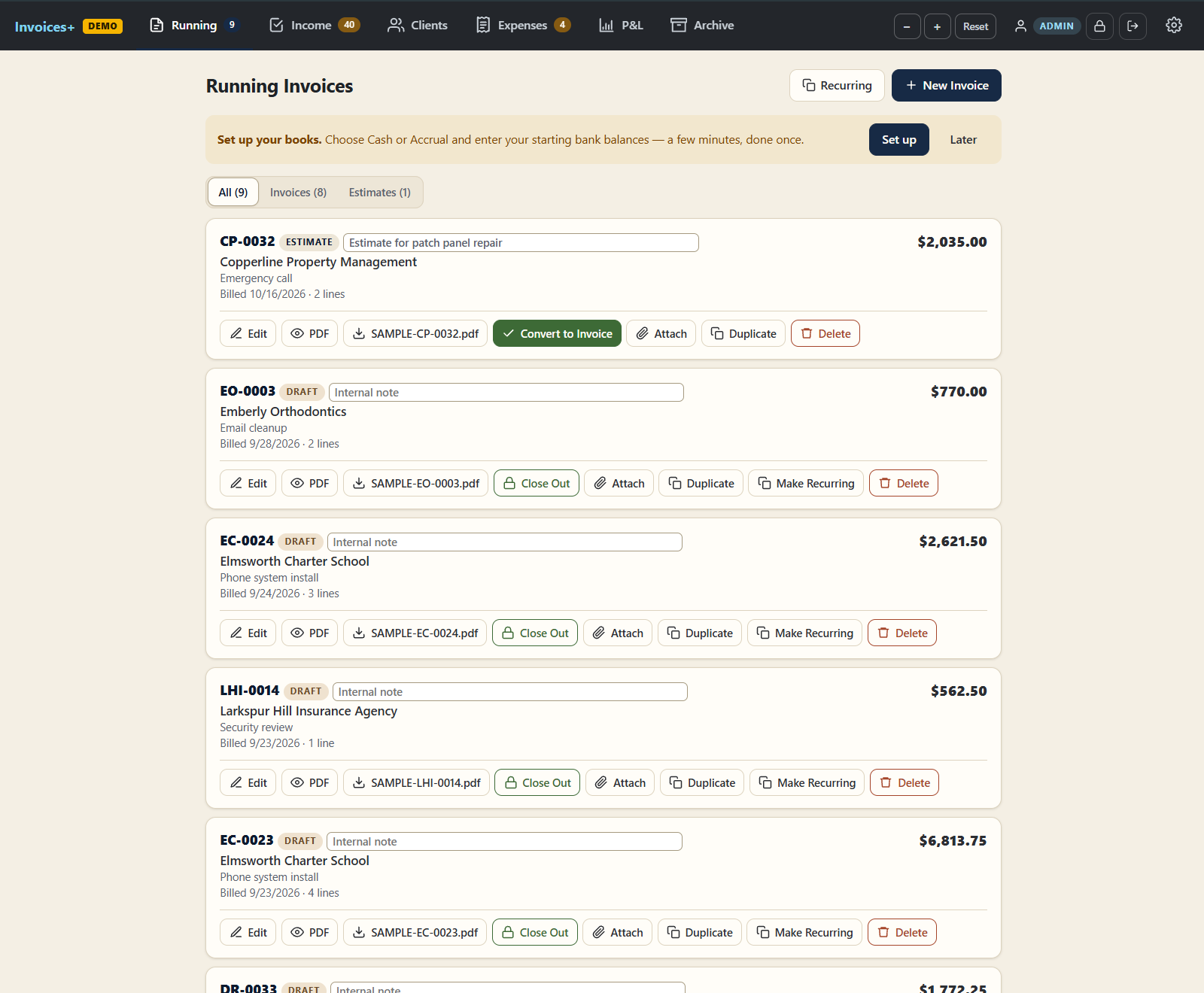
Your open drafts and estimates in one list, with the client, service and line count on each card. Filter by invoices or estimates, preview the PDF with one click, and set up recurring billing. -
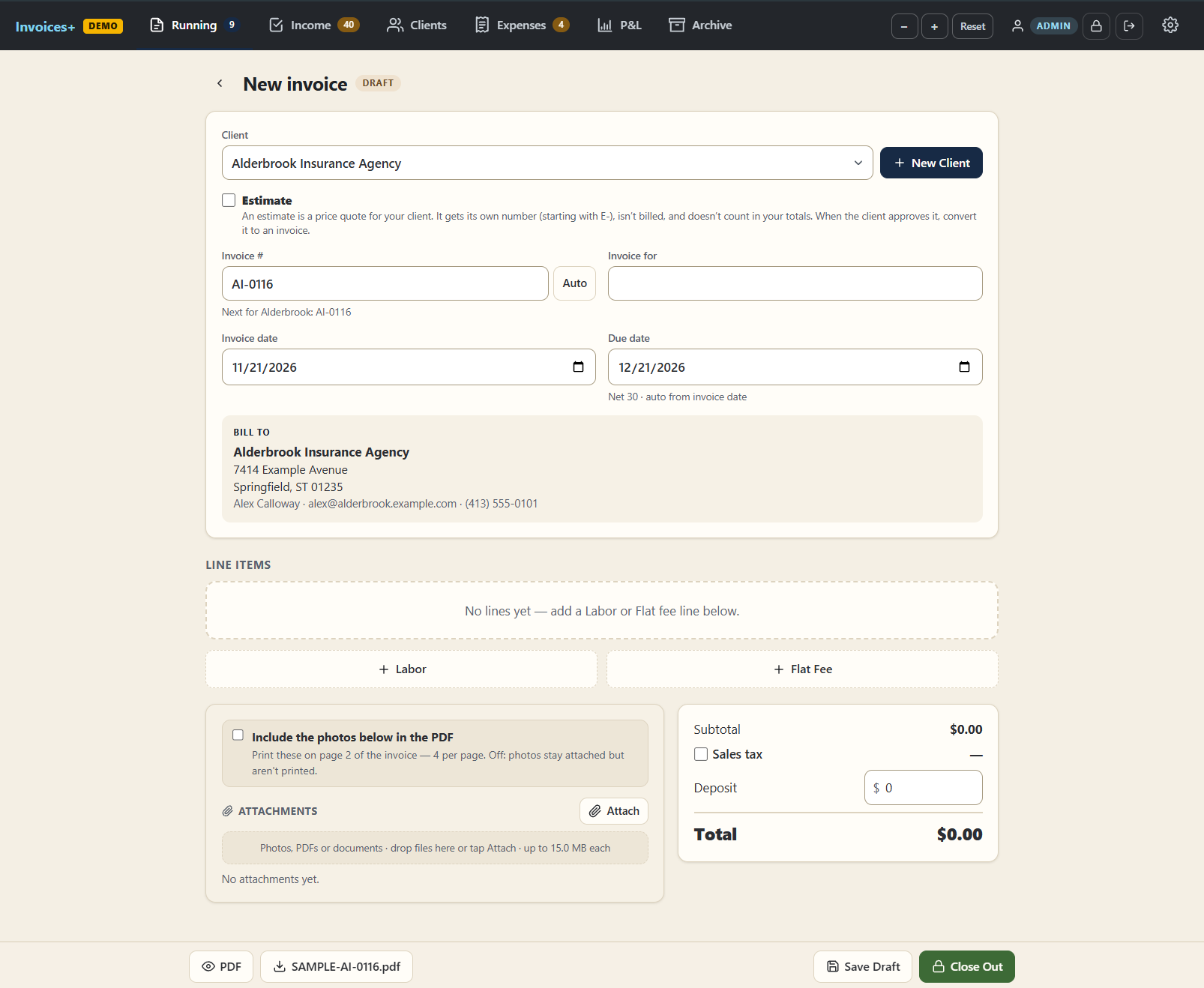
Build an invoice line by line with labor, flat fees, products, services or bundles, and turn on sales tax for the client. Attach photos or documents, then save a draft, preview, email or close it out. -
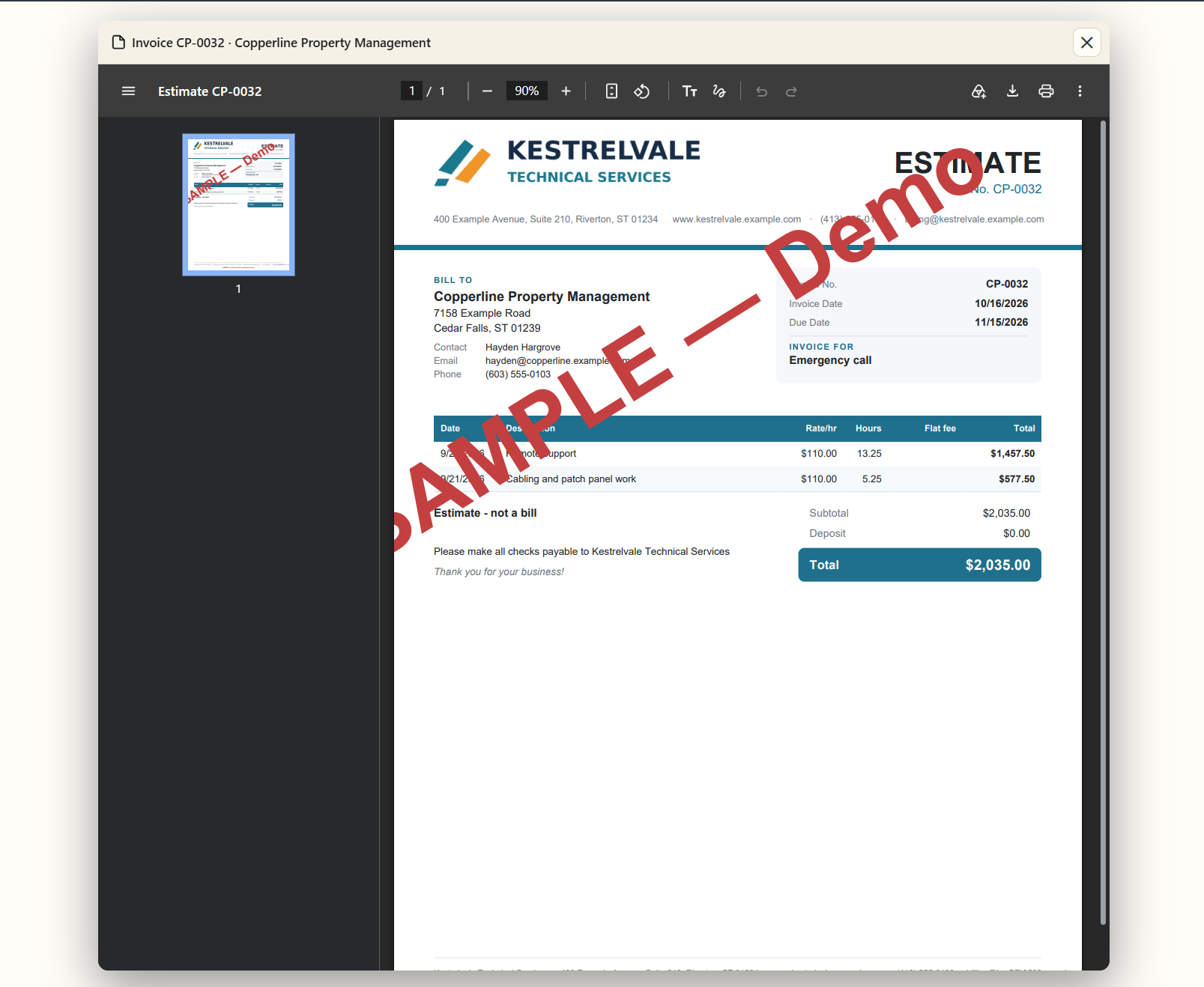
A clean PDF with your logo and business details, made when you preview, print, download or email it. -
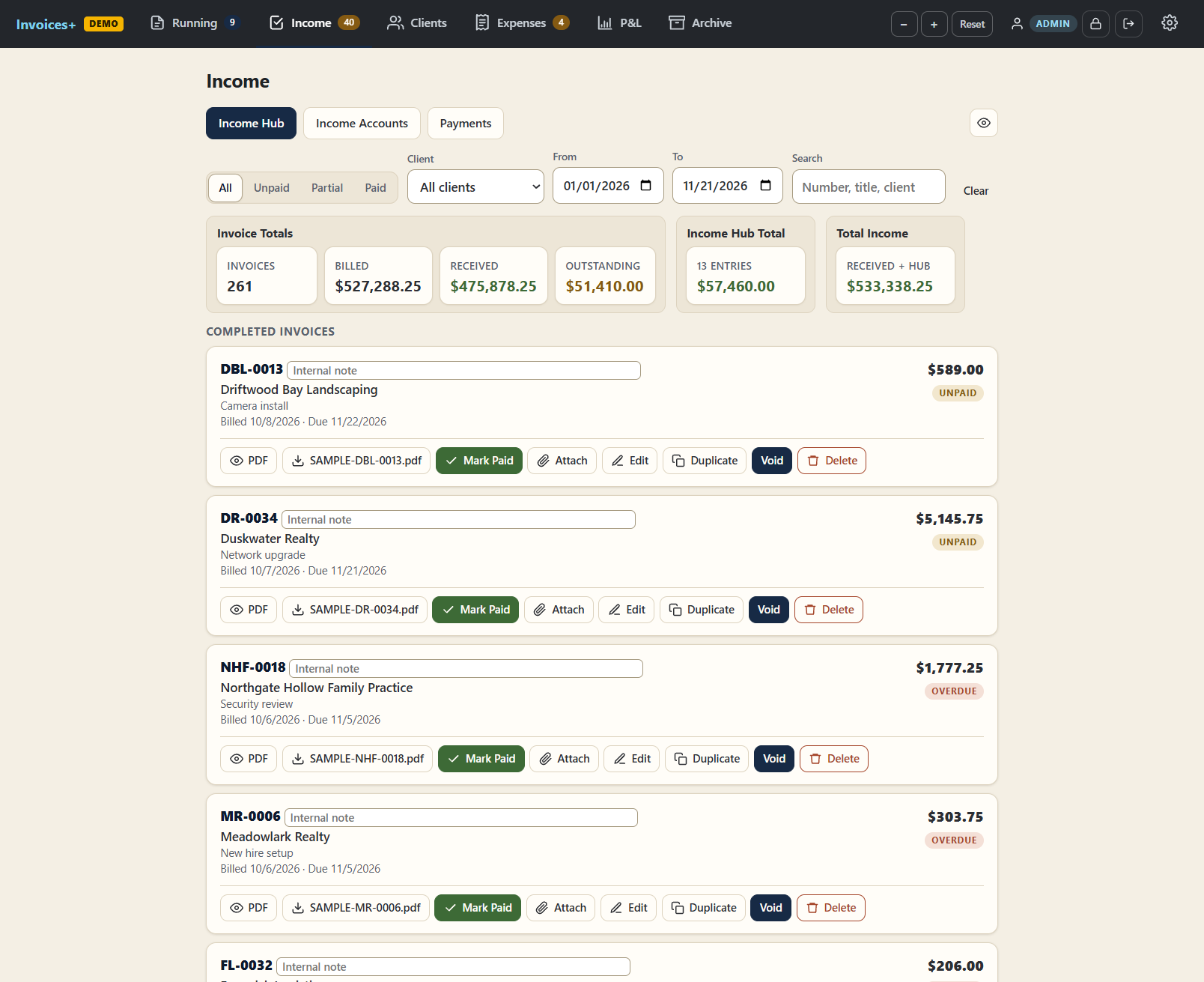
The Income page lists every closed-out invoice with its payments, partial payments and unpaid balance. It shows invoice totals at the top and filters to show only what’s still owed. -
Record income that doesn’t come from an invoice, like app stores, marketplaces or royalties, by stream and period. It flows straight into your P&L and yearly reports. -
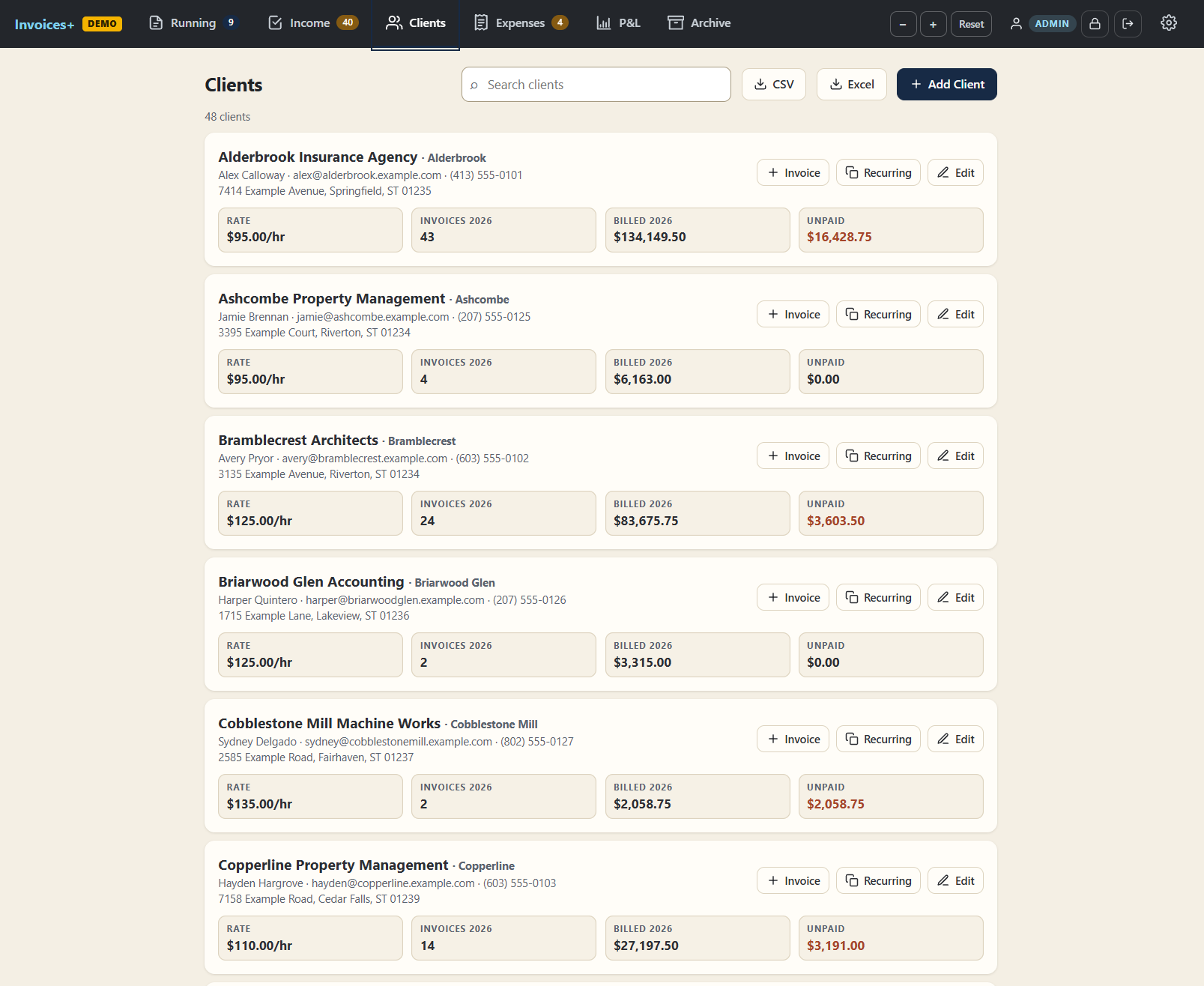
All your clients with contact details, rate, invoices billed this year and what they still owe. Open one to edit it, start an invoice or set up recurring billing. -
Every expense with its vendor, category and the account it was paid from, plus clickable By category, By month and By account summaries. Track bills you still owe and import bank statements from CSV. -
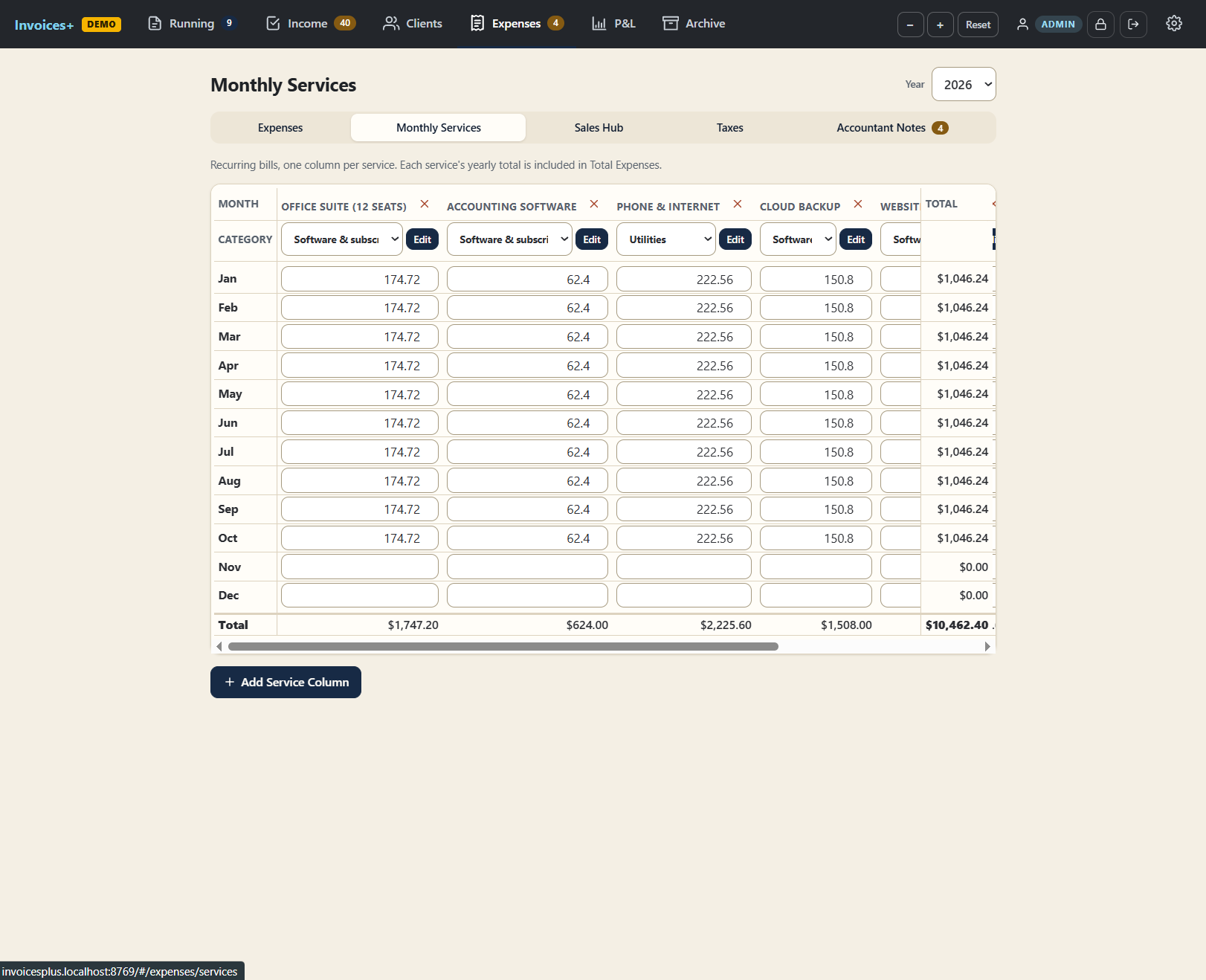
A month-by-month grid of your recurring bills, like software, phone and insurance, with one column per service and running totals. -
Track what each selling platform costs you, from fees and shipping to ads, by year, quarter, month or custom period. Each platform shows on your P&L. -
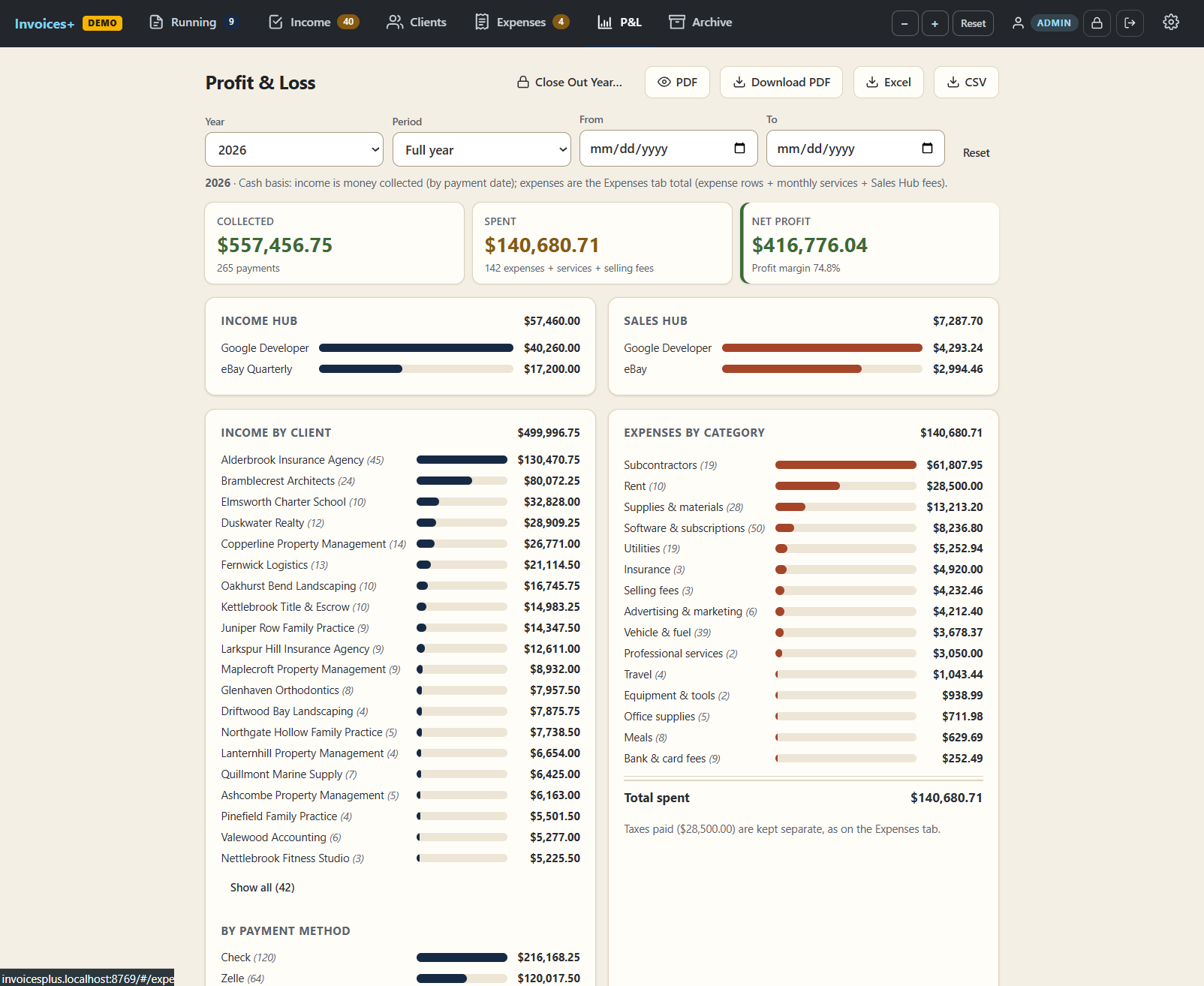
See what you collected against what you spent for any year, quarter, month or date range. Breakdowns by client, category, account and payment method, sales tax kept separate, and PDF, Excel and CSV exports. -
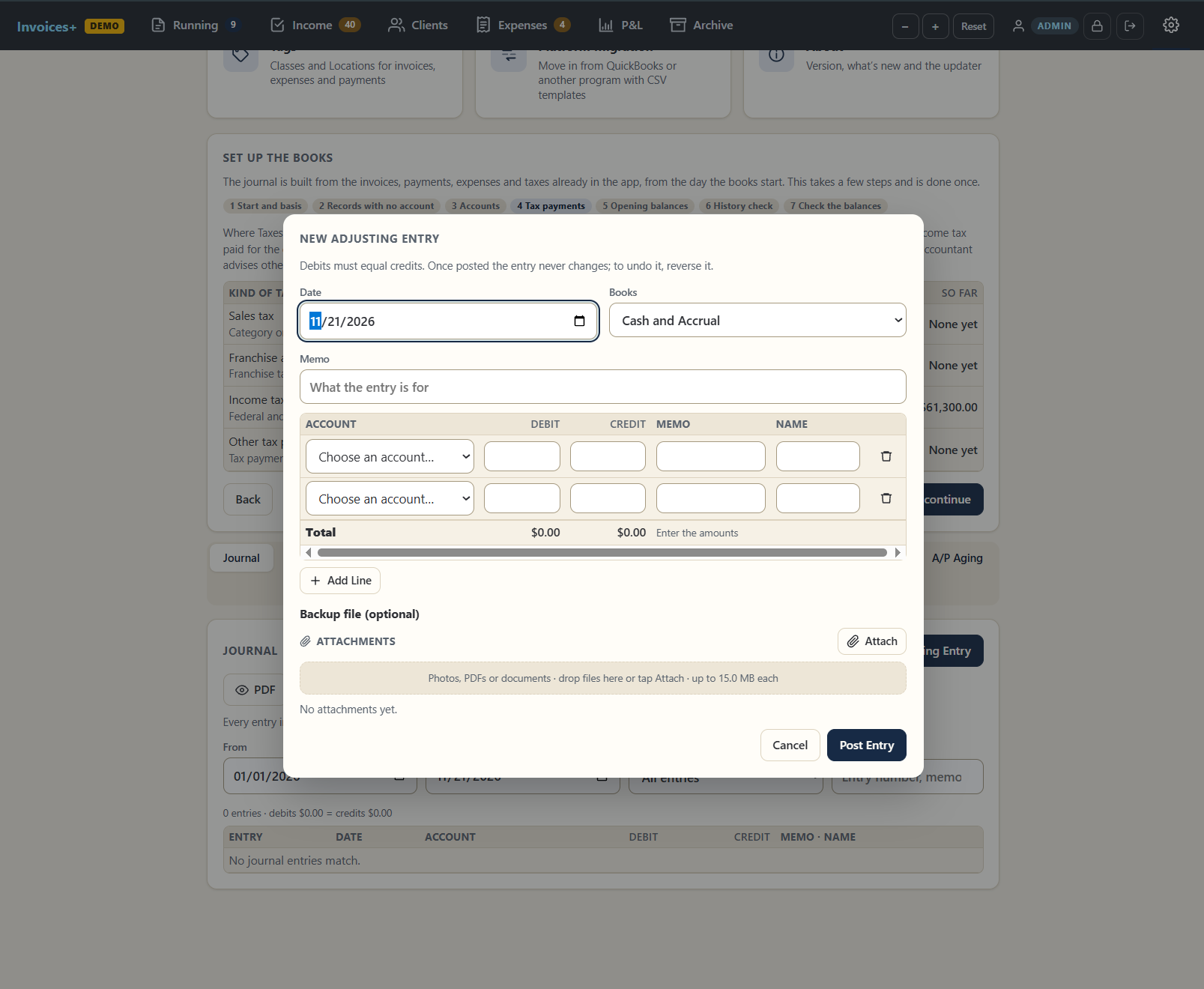
Double-entry books that fill themselves in from your invoices, payments and expenses. Admins can add adjusting entries, and nothing posted is ever overwritten. -
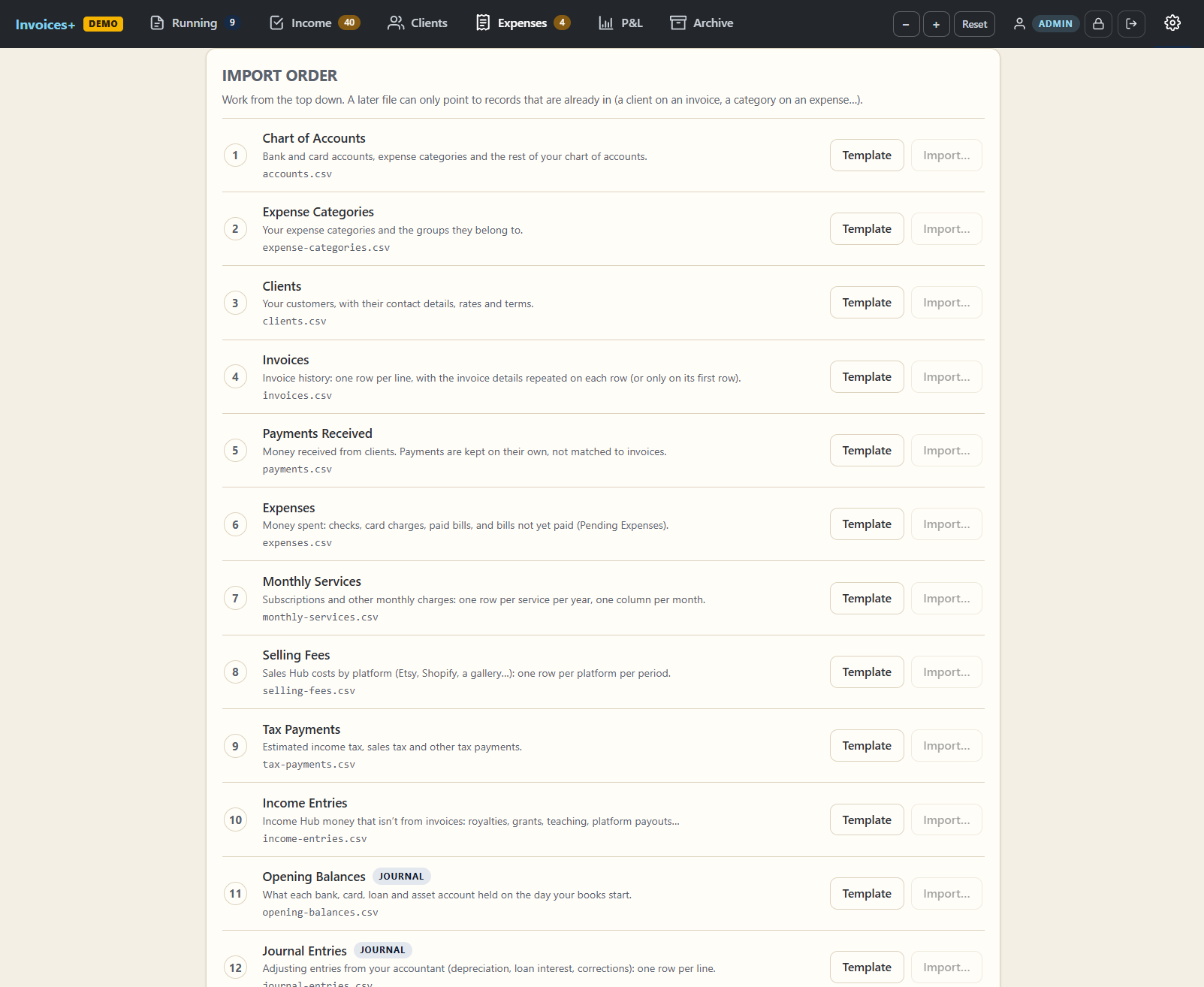
Move in from QuickBooks, a spreadsheet or another program using ready-made CSV templates. Each file is checked before anything is saved, a backup is made first, and one click undoes it. -
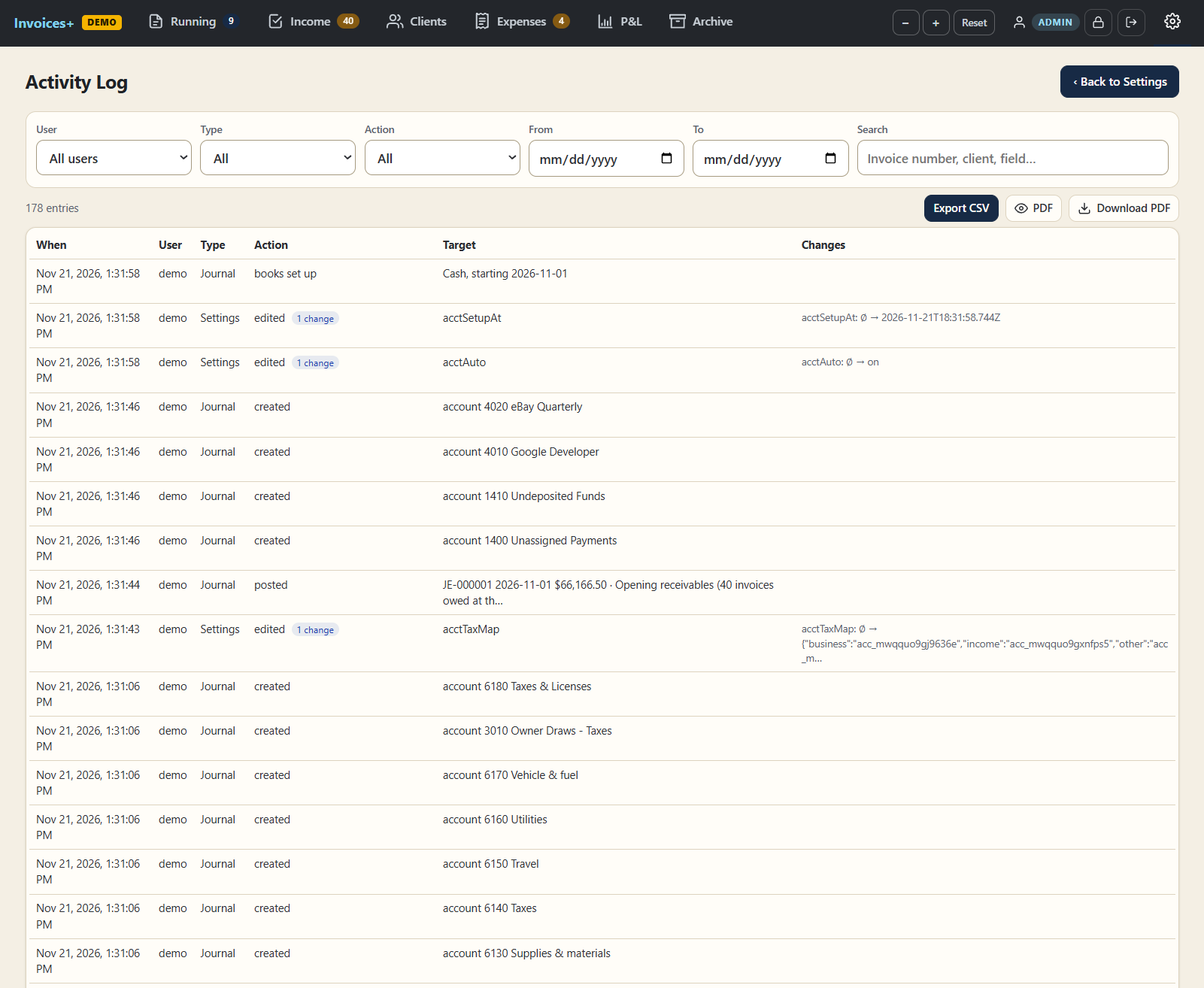
A record of every change, sign-in and setting that can’t be edited, showing who did what, when, and the old and new values. Filter it and export it to CSV or PDF. -
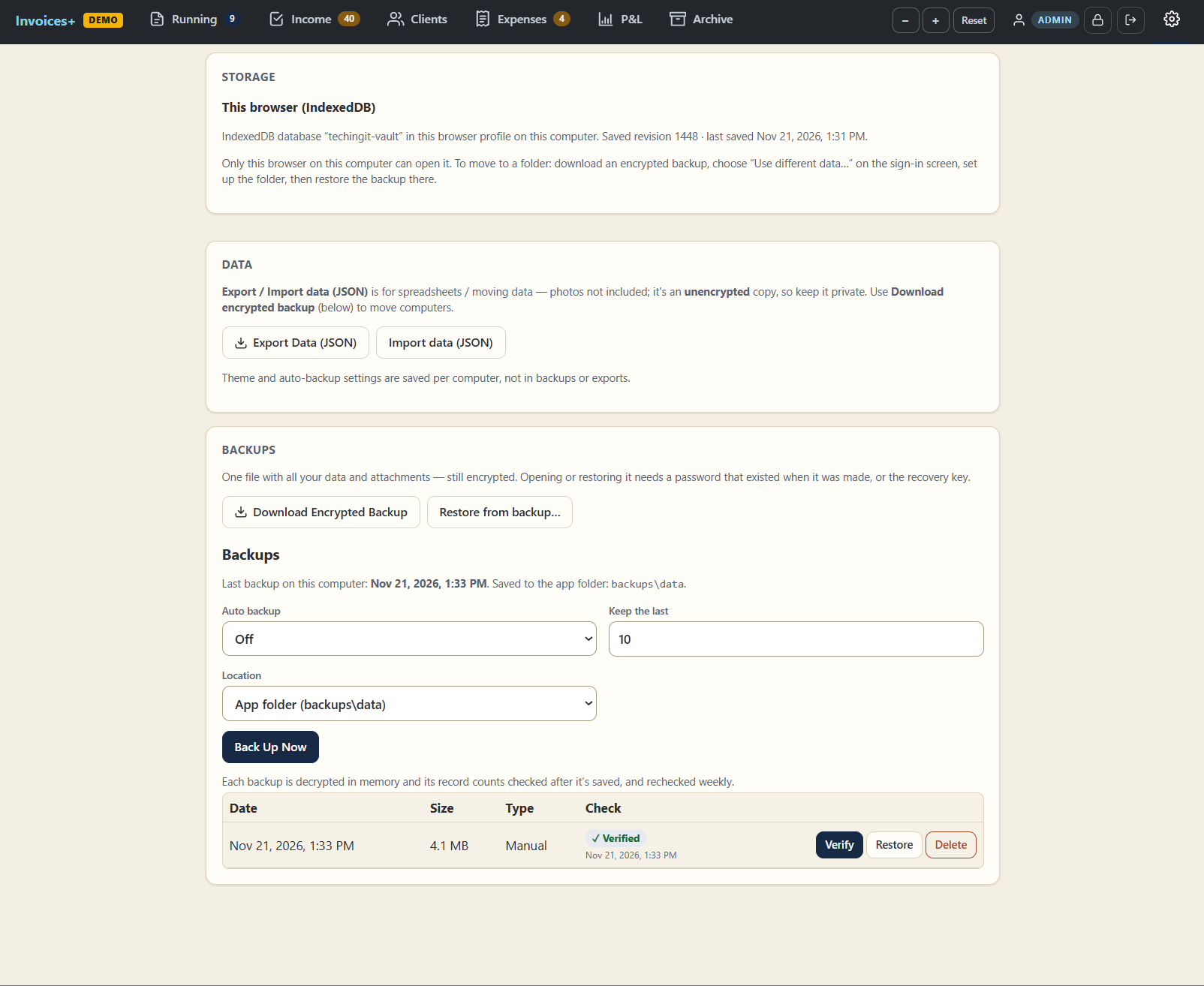
Encrypted backups made by hand or on a daily/weekly schedule, protected by Tamper Shield Technology. Each one is reopened and checked, then marked Verified or Failed, rechecked weekly, and you get an alert if one fails.


Everything included
Everything in Invoices+
- Running (draft) invoices with Labor, Flat fee, Products, Services and Bundles line items
- Invoice PDFs to preview, print, download or email
- Close out, Back to Running, duplicate, void and un-void invoices
- Estimates with E- numbers and one-click convert to an invoice
- Recurring invoices, weekly up to yearly, with catch-up
- Sequential or Patterned invoice numbering
- Per-client sales tax, reported apart from income
- Per-client hourly rates
- Optional photo pages on invoice PDFs
- Internal invoice notes that are never printed or emailed
- Email invoices and estimates from your own email account
- Income tab with partial payments and unpaid filter
- Payments page with Tags filters
- Delinquency report with aging
- Income Accounts totals
- Income Hub for income with no invoice
- Client list with merge duplicates
- Expenses with category groups, attachments and summaries
- Pending Expenses (bills you owe)
- Monthly services grid
- Sales Hub for selling-platform costs
- Taxes kept apart from spending
- Accountant notes and Flagged for accounting
- Expenses CSV import with saved bank templates and AI prompt helper
- Profit & Loss with Income Hub and Sales Hub boxes
- Yearly tracker
- Year close-out and Archive
- Tags: Classes and Locations
- Double-entry Journal, Cash or Accrual
- Chart of Accounts, General Ledger, Trial Balance, Balance Sheet
- A/R and A/P Aging, Sales by Period, Check Register
- Bank and card Reconcile
- Fixed Assets with depreciation, and Locked Periods
- Exports of records and reports to PDF, Excel and CSV
- Platform Migration with 12 ready-made templates, checks, backup and undo
- Admin, Editor and Viewer roles
- Multi-user on a shared folder
- AES-256-GCM encrypted data, attachments and backups
- Verified/Failed backup health checks with alerts
- Activity Log that can’t be edited
- Login lockout and email security alerts
- Program-file integrity check and signed updates
- In-app updater with automatic rollback
- Themes (Default, Paper, Dark) and zoom controls
- Links with Inventory+
- Windows, Mac and Linux
Plans
Invoices+ plans
Billed yearly. Local-only, no cloud: your data stays on your own computers, part of the TechingAPPS zero-exposure approach. Protected by Tamper Shield Technology.
Solo
1 user, 1 computer
$179 / year
- All Premium features
- All updates while subscribed
- Offline activation for computers without internet
Most popular
Team
5 users, 5 computers
$449 / year
- All Premium features
- All updates while subscribed
- Offline activation for computers without internet
Enterprise
20 users, 20 computers
$999 / year
- All Premium features
- All updates while subscribed
- Offline activation for computers without internet
Prices in US dollars, plus sales tax where it applies. Secure checkout by Stripe; your license key appears right after checkout and arrives by email.
Bundle
Invoices+ + Inventory+
Both apps, linked together, in one yearly subscription. One license key per app, same plan size in both, 15% off the two prices together.
Solo
1 user, 1 computer in each app
$295.80 / year
$348 You save $52.20 a year
- All Premium features
- All updates while subscribed
- Offline activation for computers without internet
Most popular
Team
5 users, 5 computers in each app
$678.30 / year
$798 You save $119.70 a year
- All Premium features
- All updates while subscribed
- Offline activation for computers without internet
Enterprise
20 users, 20 computers in each app
$1,273.30 / year
$1,498 You save $224.70 a year
- All Premium features
- All updates while subscribed
- Offline activation for computers without internet
Requirements
System requirements
- Windows: setup program.
- Mac: disk image, signed and notarized by Apple.
- Linux: archive with a desktop/menu shortcut.
- A Chromium-family browser (Brave, Chrome, Edge or Chromium). The launcher picks one automatically.
- Current version: Invoices+ v127.
Updates
Updates and support
The in-app updater (Settings › Run updater) backs up, installs and restarts, and puts the old version back if something fails. It checks for updates automatically for Admins, at most once a day, and that can be turned off. Updates must be signed.
Questions? Email support@techingapps.com.
FAQ
Questions
Where is my data kept?
On your own computers. The app is local-only: there is no cloud account, and your business data isn’t sent to TechingAPPS. The app only contacts the license server to check your license and updates.
Users or computers?
Users are the sign-ins inside the app. Computers are the installs that can use the license at the same time. Moving to a new computer? Release the old one first.
How does the bundle work?
One yearly subscription, one license key per app (Invoices+ and Inventory+), same plan size in both, 15% off the two prices together.
Taxes and cancelling?
Prices are in US dollars, plus sales tax where it applies (worked out by Stripe at checkout). Cancel any time in Manage subscription: the plan runs to the end of the paid year.
Invoices+
Own your books again.
Local-only invoicing and accounting for Windows, Mac and Linux. No cloud account. No one else holding your numbers.
