
Desktop app · Windows, Mac, Linux
Inventory+
Inventory that runs on your computer and talks to your books.
Inventory+ is local-only inventory for small business: products, services, bundles, variants, stock, purchase orders and suppliers on Windows, Mac and Linux. Run it alone, or link it to Invoices+ for one complete accounting, invoicing and inventory platform. Zero cloud, and your data stays yours.
Local-only, zero cloud. Protected by Tamper Shield Technology.

What is Inventory+?
Inventory+ is a desktop inventory app for small businesses that sell products, services or bundles. It keeps your catalog, variants, stock, purchase orders, suppliers and pricing in one place.
Link it to Invoices+ and selling from an invoice lowers your stock, purchases land in your expenses, and your P&L sees all of it. Everything stays on your own computers, encrypted.
Local only
Zero cloud. Your stock, on your computers.
Your cost, your suppliers and your margins are nobody else’s business. Literally.
Inventory+ runs on Windows, Mac and Linux and keeps your catalog, costs and suppliers on your own computers. No cloud account and no vendor holding your numbers. Your business data isn’t sent to TechingAPPS.
- Local only: there is no cloud account.
- Runs on Windows, Mac (signed and notarized by Apple) and Linux.
- You own your data. All data, attachments and backups are encrypted (AES-256-GCM).
- Protected by Tamper Shield Technology.
Works with Invoices+
One complete accounting, invoicing and inventory platform
Inventory+ fully integrates into Invoices+. Two apps, side by side in their own windows, sharing one set of facts instead of two spreadsheets that disagree.
-
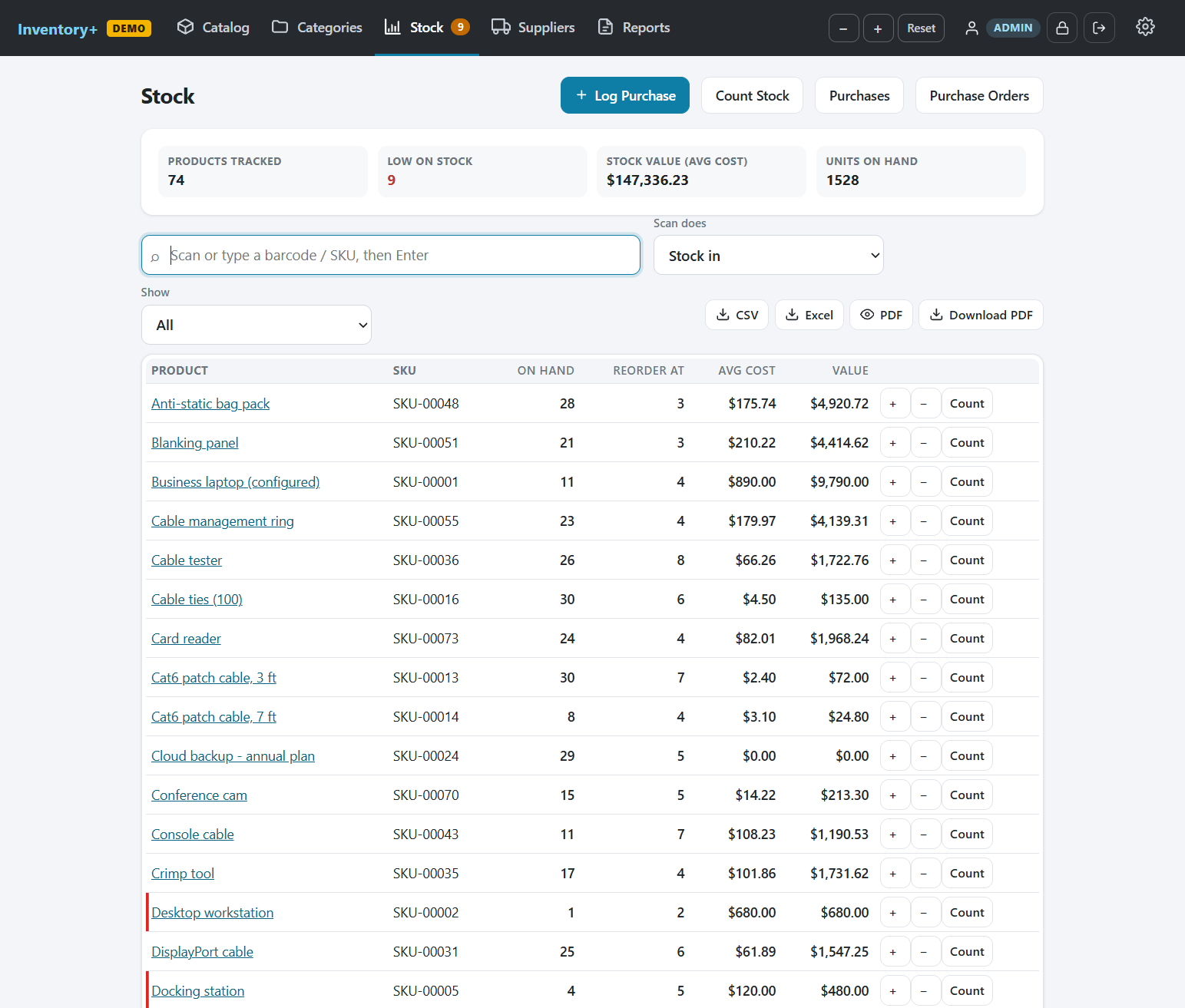
See what’s on hand, record stock in, out and counts with a reason, and find what’s running low. Works with a barcode scanner. Sell straight from the catalog
On an invoice or estimate in Invoices+, Add Service, Add Product and Add Bundle pick straight from the Inventory+ catalog, with variants, price and stock shown. Selling lowers stock; voiding, deleting or changing the invoice puts it back. Estimates never change stock.
-
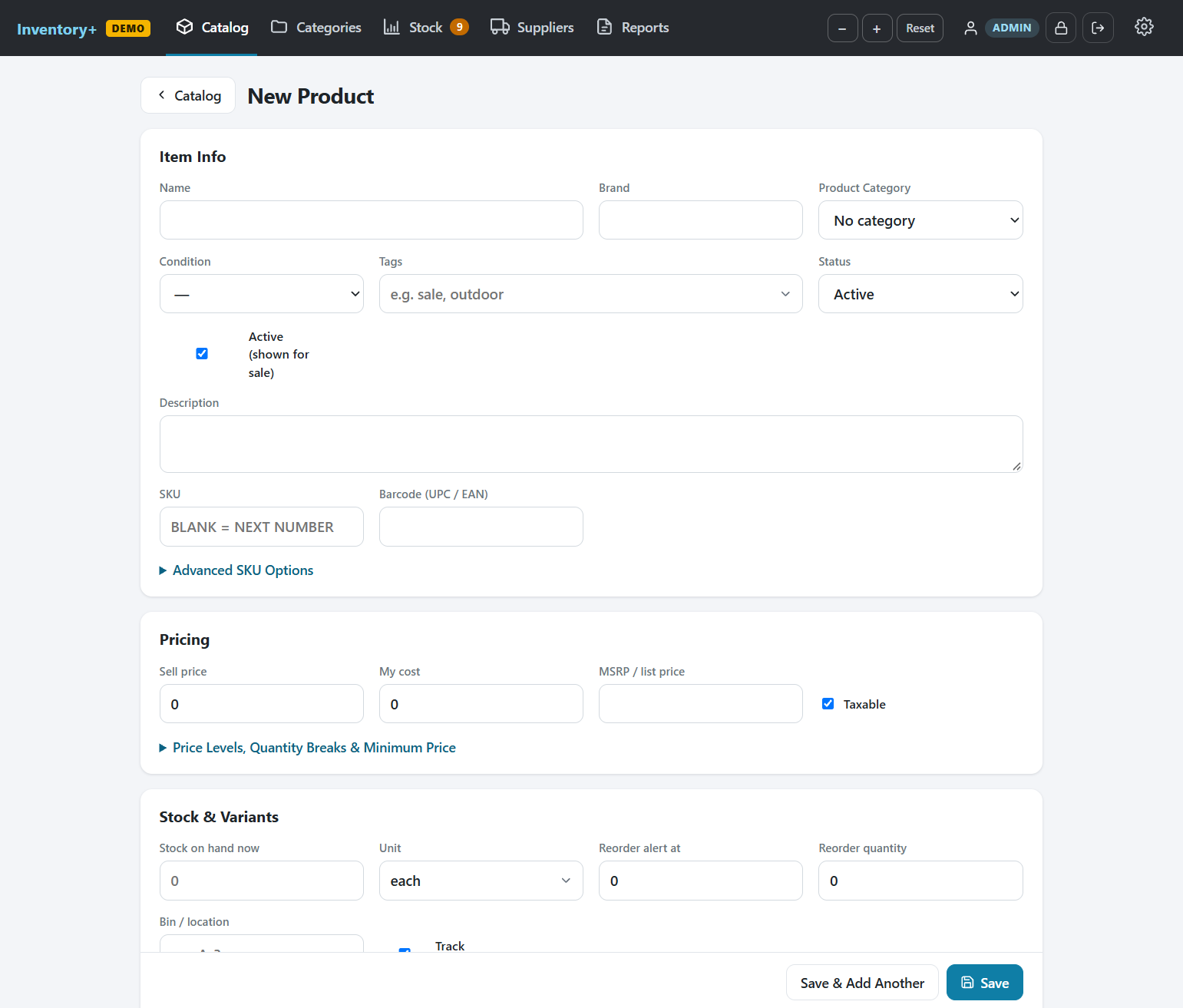
Add a product with its SKU, barcode, brand, price, cost, supplier and stock. Turn on variants like size and color, and every combination is set up for you. Pricing that follows the client
A client’s price level and quantity breaks are applied automatically. A price you type is marked “overridden,” and going under the minimum price needs an Admin.
-
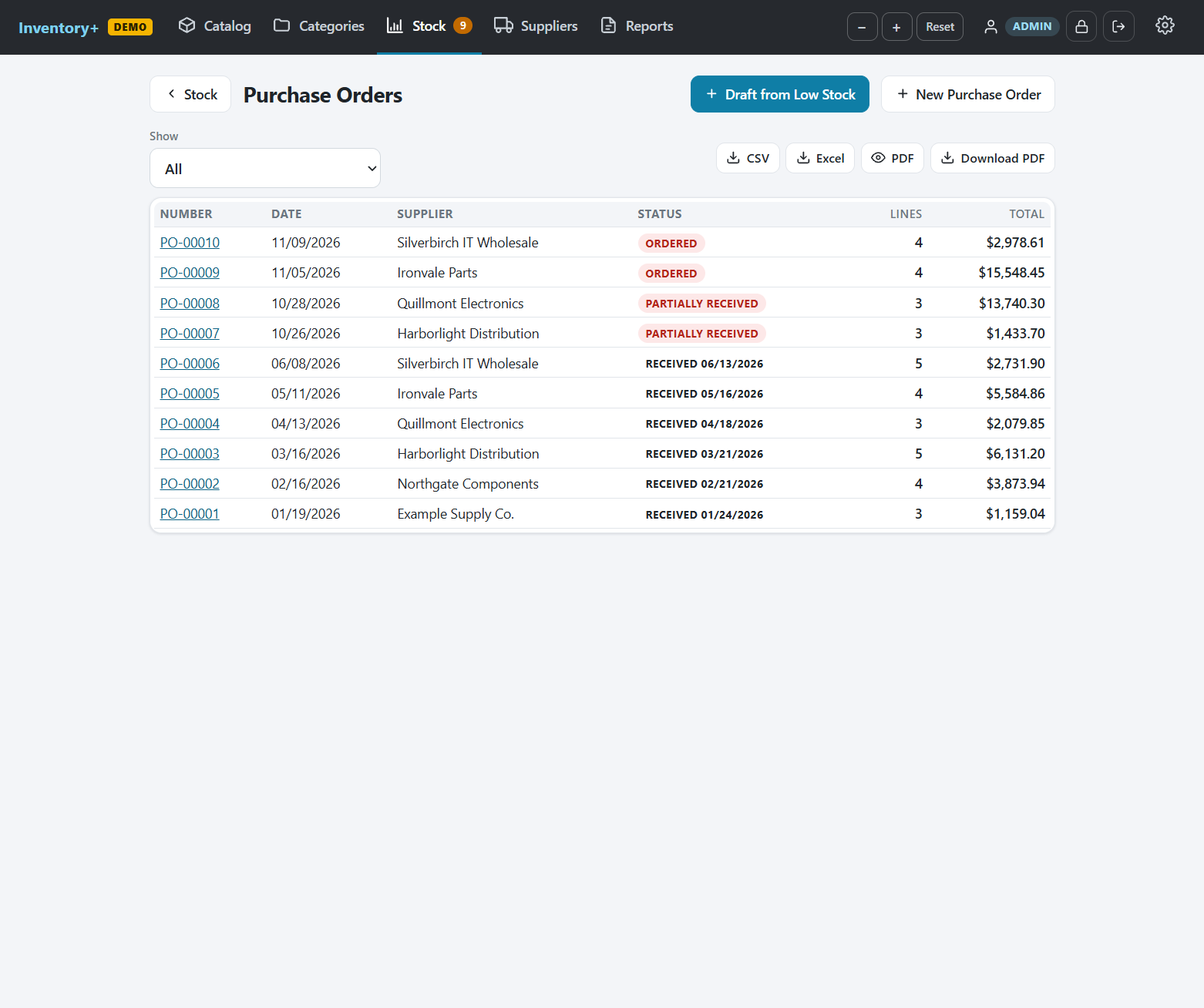
Build purchase orders by supplier, email them out, and receive all or part of an order as it arrives. Stock and average cost update as items come in. Purchases land in your books
Inventory+ purchases and purchase orders show up as expenses in Invoices+ (Expenses › Inventory+), count in the P&L and post to the Journal. Vendor refunds and credits sync both ways, and Invoices+ sales feed the Sales by Product report. Approved Invoices+ users sign in with the same password.


Platform Migration
Move your catalog in without the copy-paste marathon
Nobody should retype a product list. Platform Migration means you don’t.
Settings › Platform Migration gives you ready-made templates for every record type, 7 in all, using the app’s own columns. Build your CSV imports easily from QuickBooks, another inventory program or a spreadsheet, one file at a time.
- 7 ready-made templates: suppliers, categories, products and services, variants, supplier prices, opening stock and open purchase orders.
- Many QuickBooks and Shopify column names are recognized for you.
- Every file is checked before anything is saved.
- A backup is made automatically first, and one-click Undo restores it.
- Duplicates are skipped.

Catalog
Products, services, bundles and variants
-
Catalog
Products, services and bundles in categories and folders, in a table or card view with search, Low stock, Category and Show filters. Brand, Active/Discontinued, part numbers, barcodes, custom fields, bin/location, weight and dimensions, and buying by the case while selling each.
-
Variants
Size, Color and more: every combination is created for you, each with its own price, cost, MSRP and stock. Variant CSV import and export.
-
SKUs and barcodes
Automatic sequential SKUs, or your own SKUs, patterns, category prefixes, variant SKUs and barcodes.
-
Bundles
Products and services sold as one item. Price = components minus a discount, and it shows how many you can build from stock on hand.
-
Categories
Service, Product and Bundle categories with item counts, rename, delete and move items.
-
Barcode labels
Avery 5160 sheets or a label printer.
Stock and purchasing
Stock, purchase orders and suppliers
-
Stock
On hand, stock in and out, counts and adjustments with reasons, moving average cost, low-stock list and reorder alerts, a Count Stock page with a printable sheet, barcode scanner support and a Backordered list.
-
Purchases
Log purchases made outside the app, record how they were paid, and send them to Invoices+ as expenses.
-
Purchase orders
Draft POs by supplier, email a PO to the supplier, receive part or all of it (Ordered / Partially Received / Received), Close Short, and cost changes update the average cost.
-
Suppliers
Contact, optional address and fax, order history, each supplier’s SKU and cost, several suppliers per item with lead time, minimum order and pack size, plus vendor refunds and credits.
-
Pricing
Price levels (Retail, Dealer, Wholesale or your own), quantity breaks, default quantity discounts by price range, and a minimum-price floor.
-
Reports
Sales by Product, Inventory Value, Low Stock, Stock Moves, Variants, Purchases and Purchase Orders, exported to PDF, Excel and CSV.
Security
Protected by Tamper Shield Technology
The same technology that protects your websites in Ultimate Tamper Shield. It started here, in Invoices+, before it ever touched WordPress.
-
Encrypted data and backups
All data, attachments and backups are encrypted with AES-256-GCM, with keys made from passwords and a recovery key.
-
Every backup checked
Each backup is reopened and its record counts compared right after saving and again weekly, then marked Verified or Failed. A failed check sends you an email alert.
-
Activity Log you can’t quietly edit
Every create, edit (old → new), void, delete, sign-in and setting change is recorded. The Activity Log can’t be edited, and it shows a “Log altered” warning if anyone changes it.
-
Program-file integrity check
Program files are checked against a signed list of every file at startup and on demand (Settings › Security › Check file integrity). A changed copy still opens your data but can’t install updates, and an alert is sent.
-
Signed updates
Updates must be signed, or they don’t install.
-
Lockouts and alerts
Sign-in locks after a set number of failed tries, survives reloads, and an Admin can unlock it. Email alerts cover failed sign-ins, lockouts, failed backup checks and tampering.
How it works
From install to selling
-
Install and link
Install on Windows, Mac or Linux. Run it alone, or link to Invoices+ at first setup (“Find Invoices+” if it isn’t found on its own).
-
Bring your catalog
Platform Migration imports suppliers, products, variants and opening stock one checked CSV at a time, with a backup first and undo.
-
Buy and receive
Send purchase orders, receive what arrives, and watch stock and average cost update.
-
Sell and report
Sell from Invoices+, let stock adjust itself, and run Sales by Product and Inventory Value reports.
Screenshots
See Inventory+
-
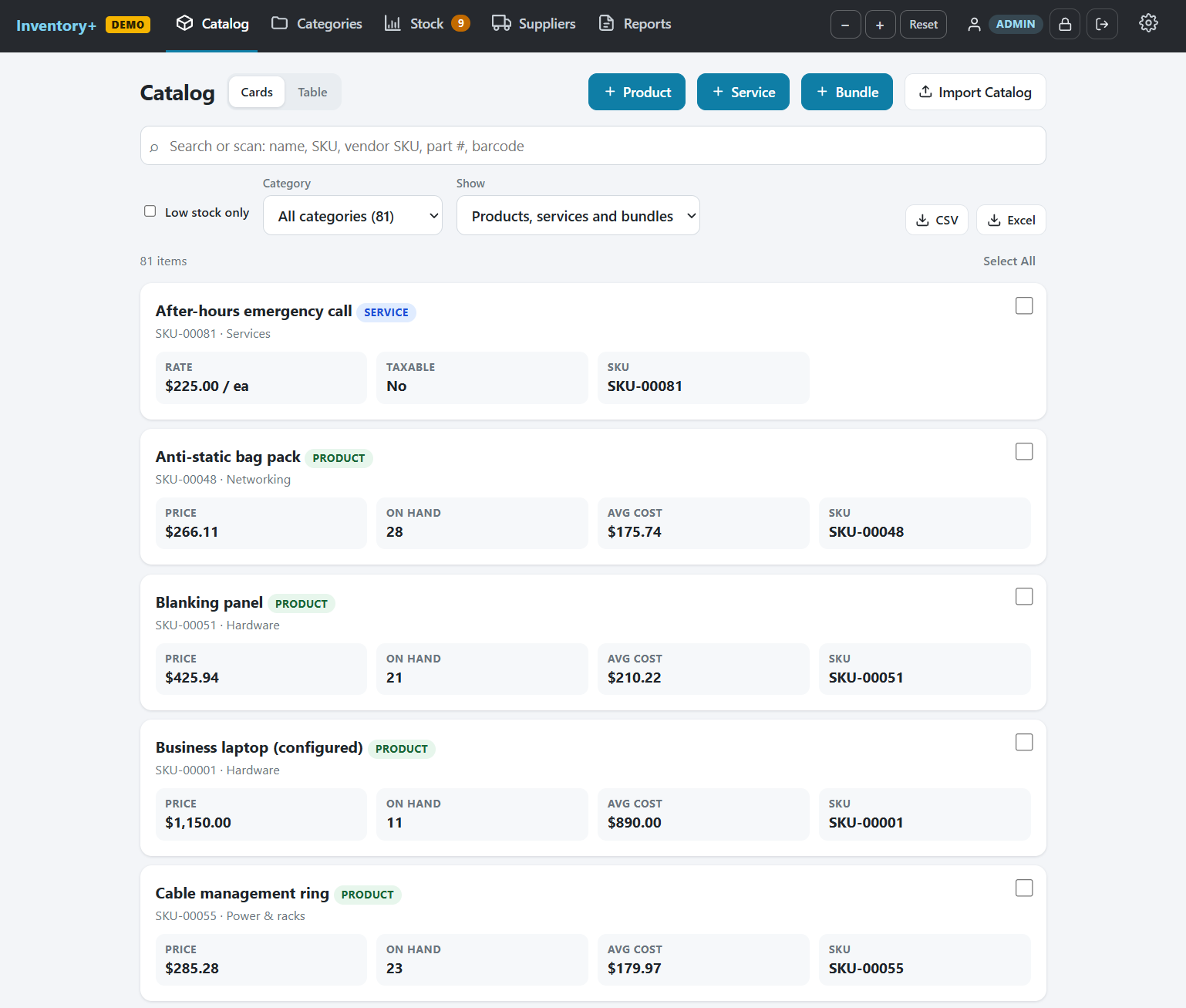
Your products, services and bundles in one searchable catalog, with stock on hand, low-stock flags and filters by category and status. -
Add a product with its SKU, barcode, brand, price, cost, supplier and stock. Turn on variants like size and color, and every combination is set up for you. -
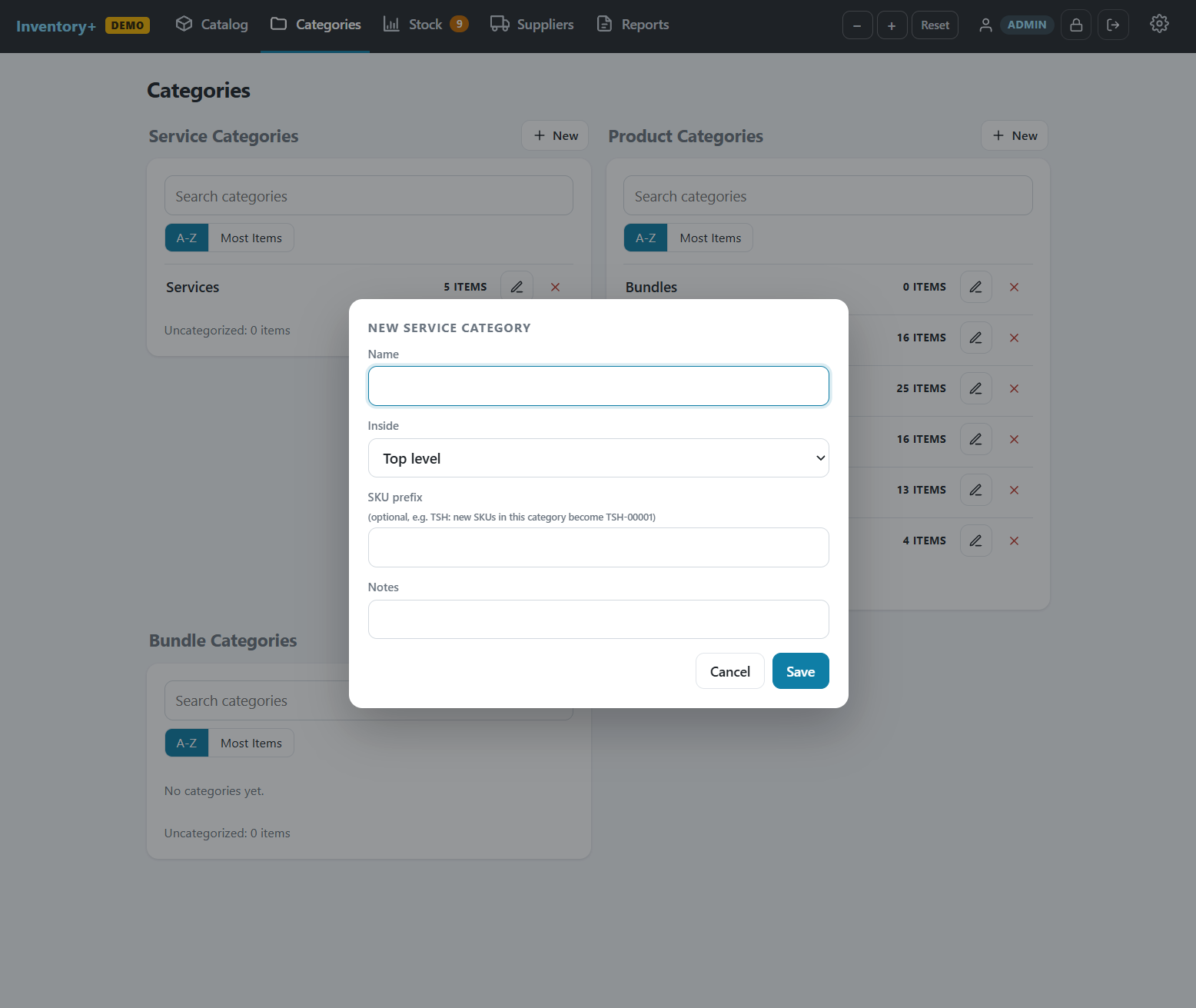
Organize your catalog into product, service and bundle categories, with item counts and easy rename, sort and move. -
See what’s on hand, record stock in, out and counts with a reason, and find what’s running low. Works with a barcode scanner. -
Build purchase orders by supplier, email them out, and receive all or part of an order as it arrives. Stock and average cost update as items come in. -
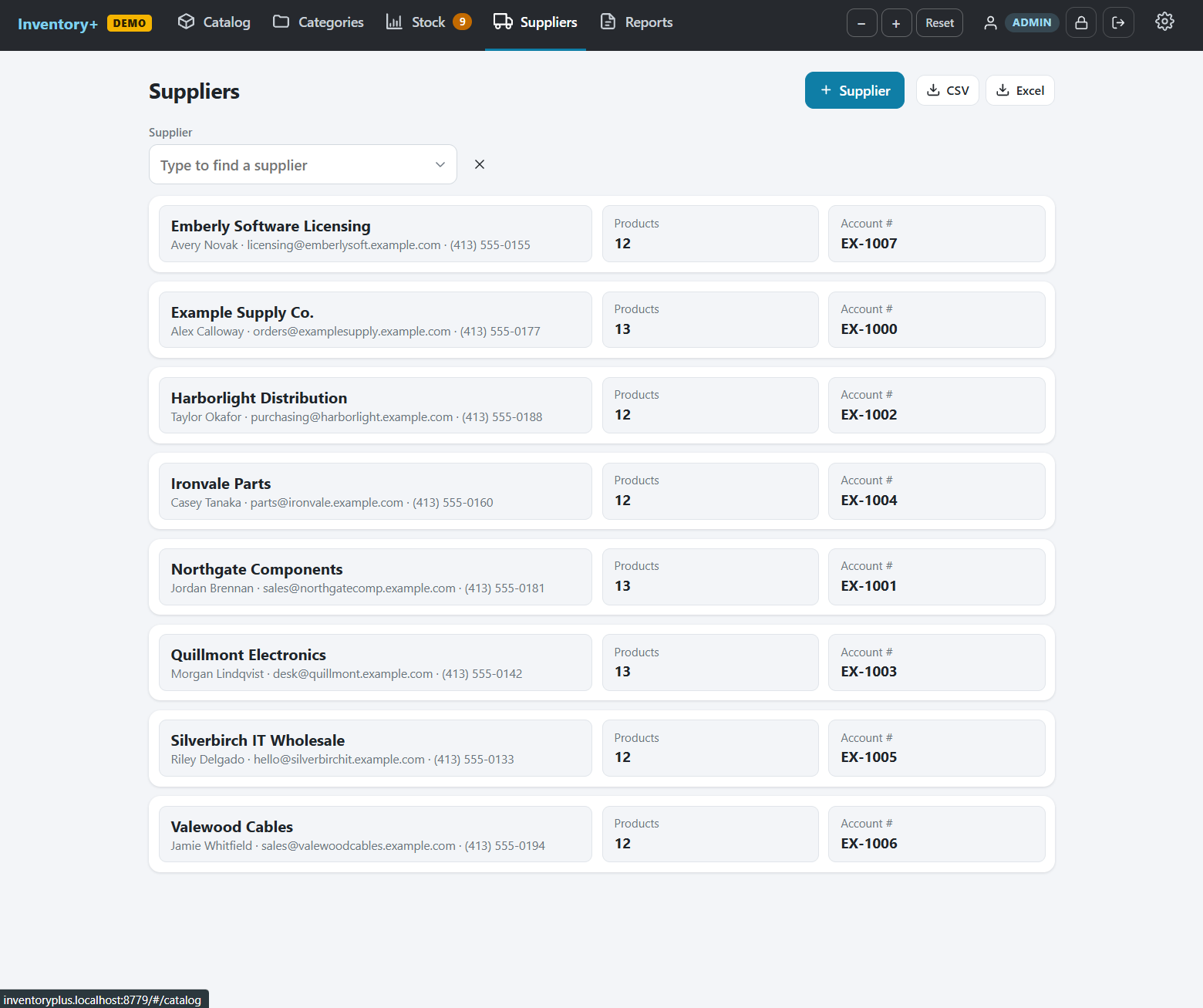
Keep each supplier’s contact details, the items and costs they carry, their order history, and any credits or refunds they owe you. -
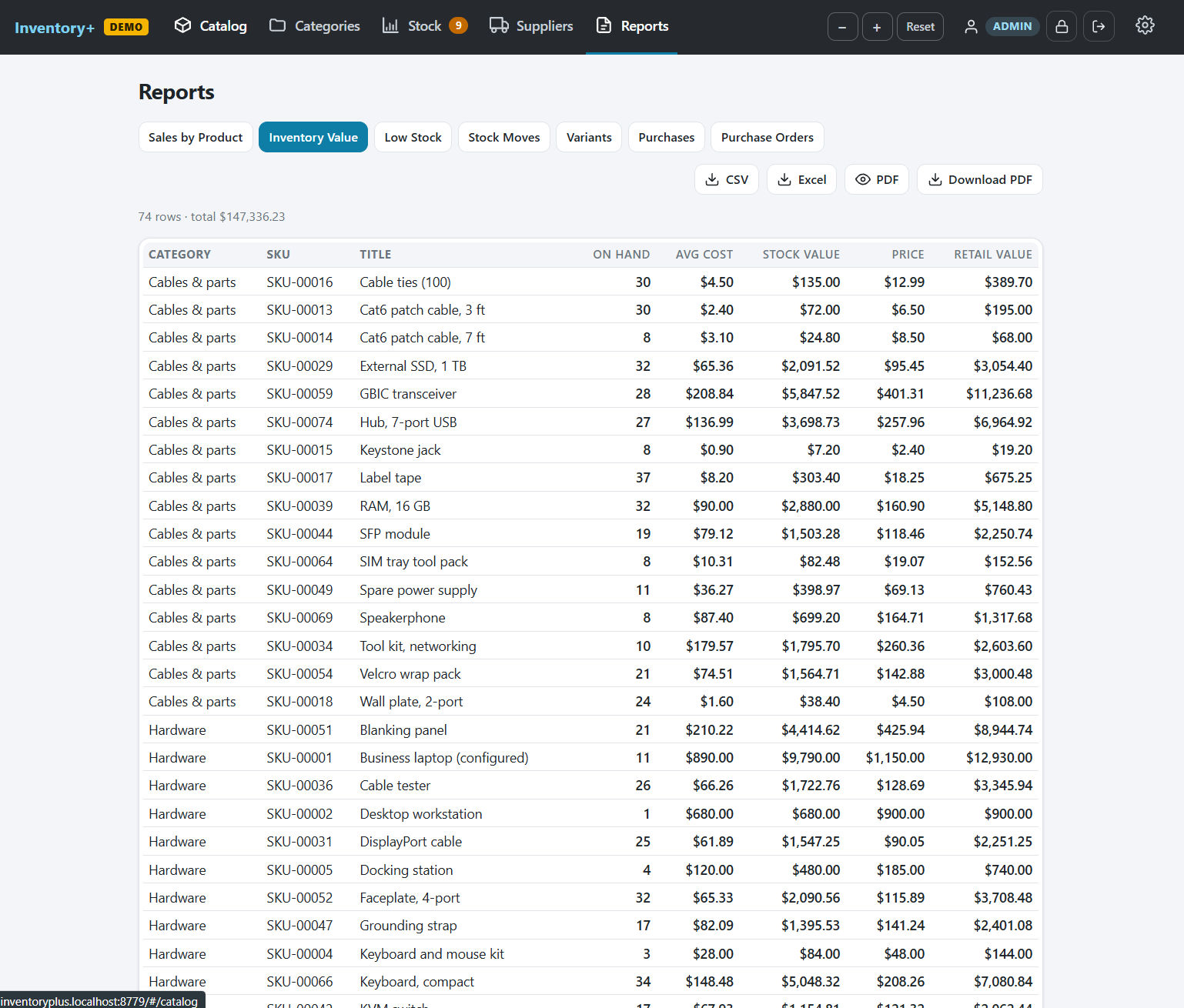
Sales by product, inventory value, low stock, stock moves, variants, purchases and purchase orders, exportable to PDF, Excel and CSV. -
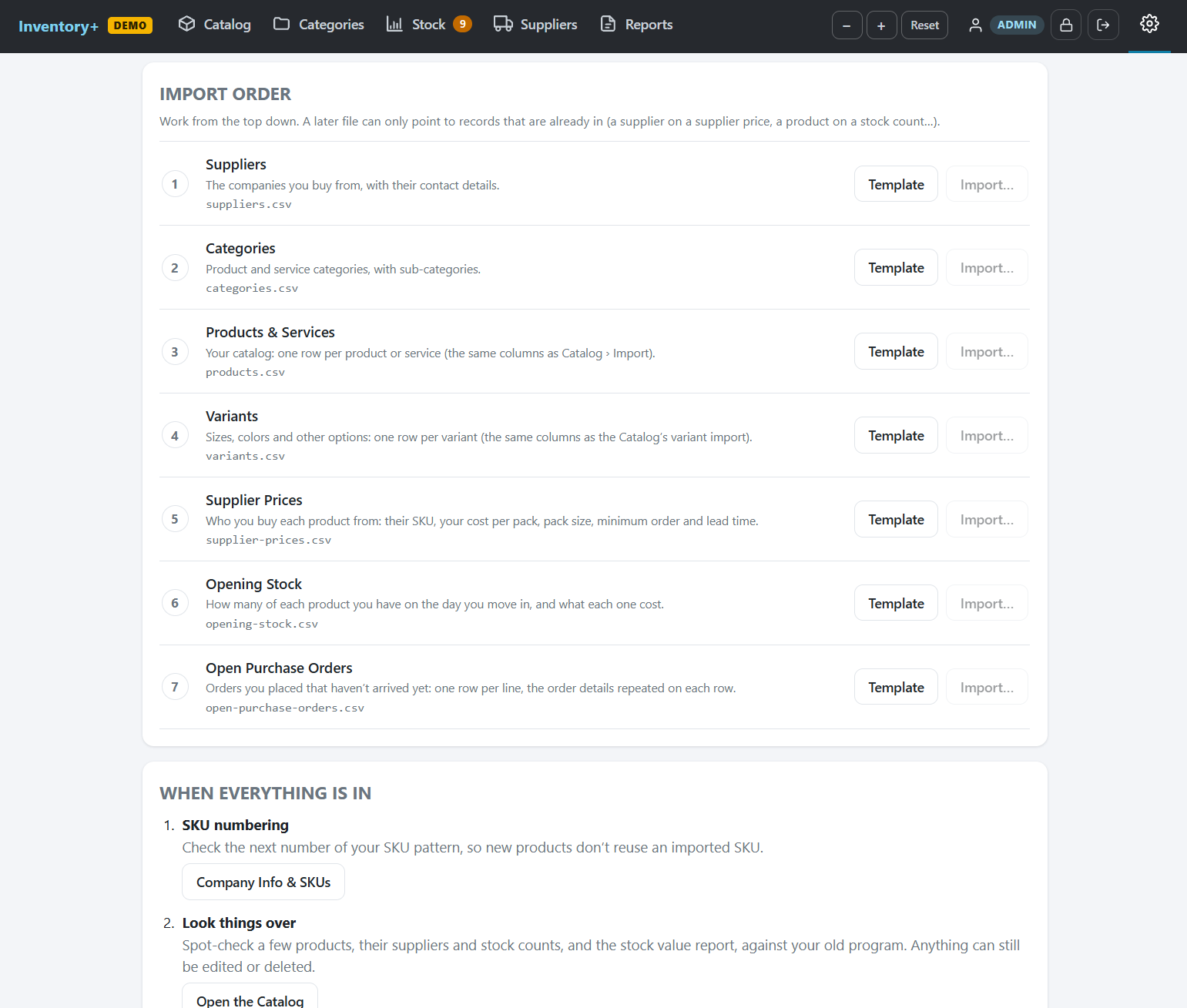
Move in from QuickBooks, another inventory program or a spreadsheet, one CSV at a time: suppliers, categories, products, variants, supplier prices, opening stock and open purchase orders. Each file is checked first, with an automatic backup and undo. -
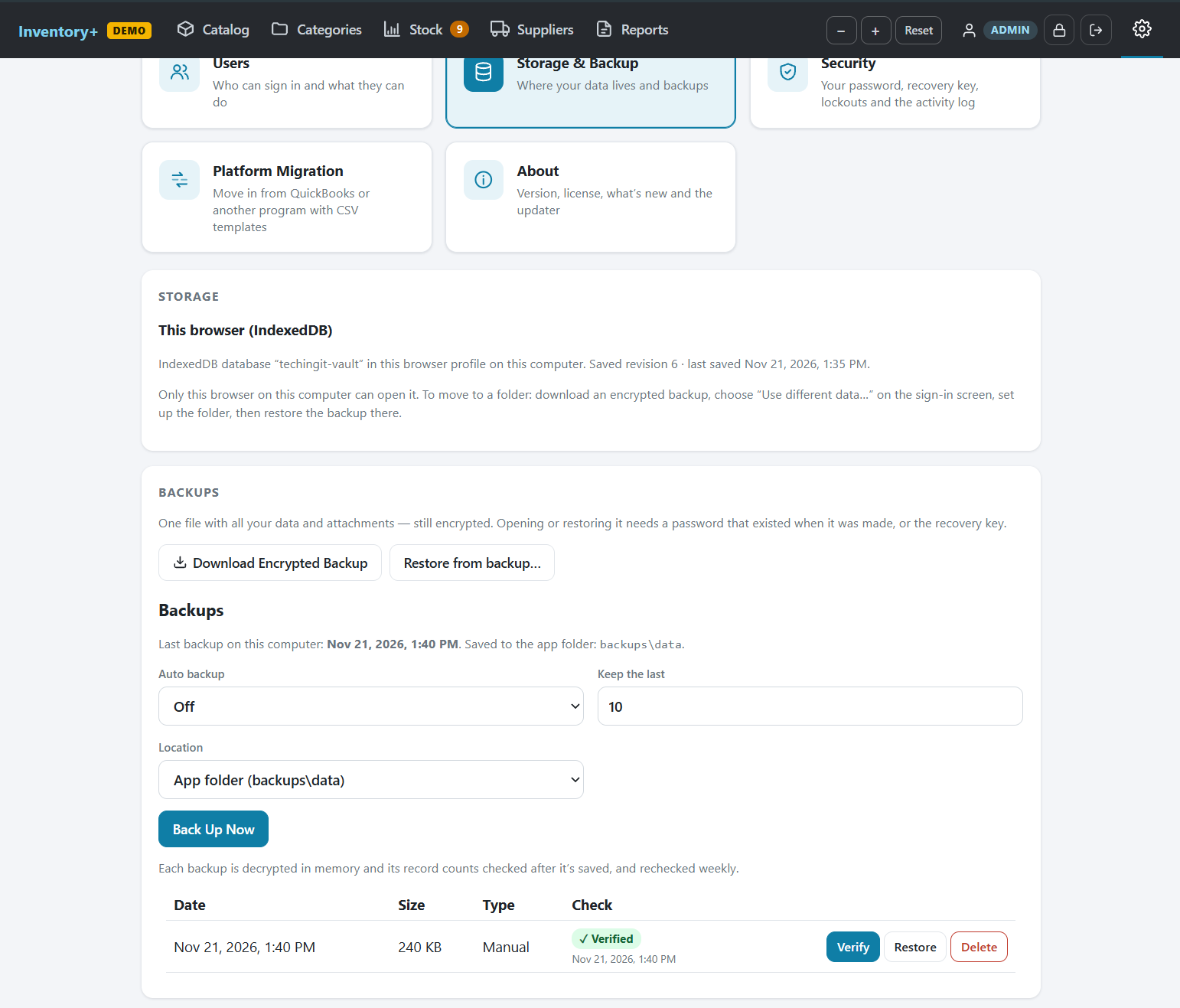
Encrypted backups, made by hand or on a schedule, protected by Tamper Shield Technology. Each is checked after saving and weekly and marked Verified or Failed.


Everything included
Everything in Inventory+
- Catalog of products, services and bundles in categories and folders
- Table or card view with search, Low stock, Category and Show filters
- Brand, Active/Discontinued, part numbers, barcodes and custom fields
- Bin/location, weight and dimensions, buy by the case and sell each
- Duplicate, Save & add another, and bulk edit
- Variants with their own price, cost, MSRP and stock
- Variant CSV import and export
- Automatic or custom SKUs, patterns, prefixes and barcodes
- Bundles priced from components minus a discount
- Categories page for services, products and bundles
- Stock in/out, counts and adjustments with reasons
- Moving average cost, low-stock list and reorder alerts
- Count Stock page with printable sheet
- Barcode scanner support and Backordered list
- Purchases sent to Invoices+ as expenses
- Purchase orders: email, partial receiving and Close Short
- Suppliers with SKUs, costs, lead time, minimum order and pack size
- Vendor refunds and vendor credits
- Price levels, quantity breaks, quantity discounts and minimum-price floor
- Barcode labels (Avery 5160 or a label printer)
- Reports: Sales by Product, Inventory Value, Low Stock, Stock Moves, Variants, Purchases, Purchase Orders
- Exports to PDF, Excel and CSV
- Catalog CSV import with column matching, preview, undo and AI prompt helper
- Platform Migration with 7 ready-made templates, checks, backup and undo
- Full integration with Invoices+
- Admin, Editor and Viewer roles
- AES-256-GCM encrypted data, attachments and backups
- Verified/Failed backup health checks with alerts
- Activity Log that can’t be edited
- Login lockout and email security alerts
- Program-file integrity check and signed updates
- In-app updater with automatic update check
- Windows, Mac and Linux
Plans
Inventory+ plans
Billed yearly. Local-only, no cloud: your data stays on your own computers, part of the TechingAPPS zero-exposure approach. Protected by Tamper Shield Technology.
Solo
1 user, 1 computer
$169 / year
- All Premium features
- All updates while subscribed
- Offline activation for computers without internet
Most popular
Team
5 users, 5 computers
$349 / year
- All Premium features
- All updates while subscribed
- Offline activation for computers without internet
Enterprise
20 users, 20 computers
$499 / year
- All Premium features
- All updates while subscribed
- Offline activation for computers without internet
Prices in US dollars, plus sales tax where it applies. Secure checkout by Stripe; your license key appears right after checkout and arrives by email.
Bundle
Invoices+ + Inventory+
Both apps, linked together, in one yearly subscription. One license key per app, same plan size in both, 15% off the two prices together.
Solo
1 user, 1 computer in each app
$295.80 / year
$348 You save $52.20 a year
- All Premium features
- All updates while subscribed
- Offline activation for computers without internet
Most popular
Team
5 users, 5 computers in each app
$678.30 / year
$798 You save $119.70 a year
- All Premium features
- All updates while subscribed
- Offline activation for computers without internet
Enterprise
20 users, 20 computers in each app
$1,273.30 / year
$1,498 You save $224.70 a year
- All Premium features
- All updates while subscribed
- Offline activation for computers without internet
Requirements
System requirements
- Windows: setup program.
- Mac: disk image, signed and notarized by Apple.
- Linux: archive with a desktop/menu shortcut.
- A Chromium-family browser (Brave, Chrome, Edge or Chromium). The launcher picks one automatically.
- Current version: Inventory+ v31.
Updates
Updates and support
The same in-app updater and automatic update check as Invoices+: it backs up, installs and restarts, and puts the old version back if something fails. Updates must be signed.
Questions? Email support@techingapps.com.
FAQ
Questions
Where is my data kept?
On your own computers. The app is local-only: there is no cloud account, and your business data isn’t sent to TechingAPPS. The app only contacts the license server to check your license and updates.
Users or computers?
Users are the sign-ins inside the app. Computers are the installs that can use the license at the same time. Moving to a new computer? Release the old one first.
How does the bundle work?
One yearly subscription, one license key per app (Invoices+ and Inventory+), same plan size in both, 15% off the two prices together.
Taxes and cancelling?
Prices are in US dollars, plus sales tax where it applies (worked out by Stripe at checkout). Cancel any time in Manage subscription: the plan runs to the end of the paid year.
Inventory+
Know what you have. Keep it to yourself.
Local-only inventory for Windows, Mac and Linux that plugs straight into Invoices+.
