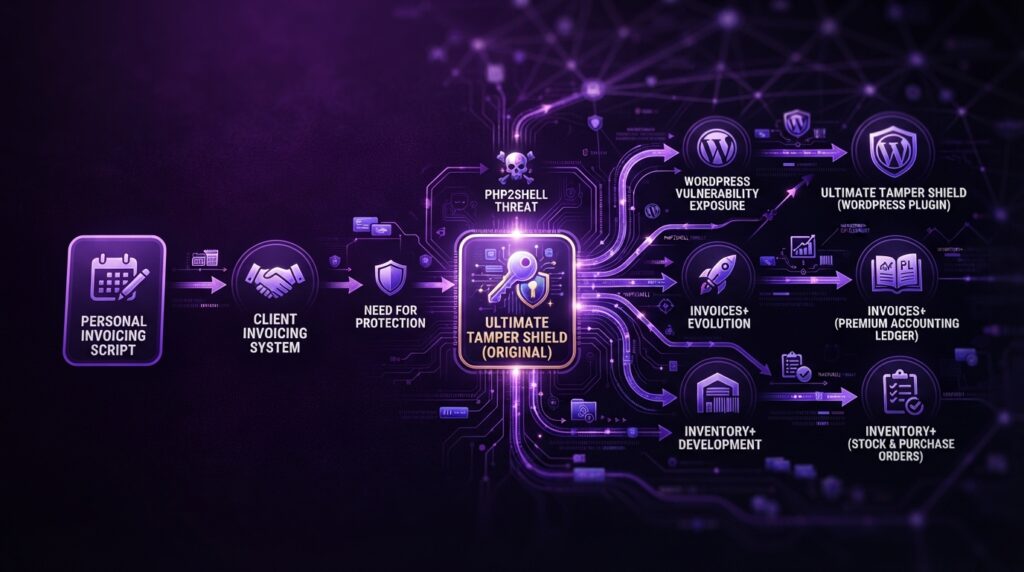
Every piece of software in the TechingAPPS suite started the exact same way: out of pure, unadulterated necessity.
When you operate under a strict local-first, zero-cloud philosophy, you quickly realize that the market is flooded with software that wants to rent your own data back to you, and sell it to other vendors. You either accept the subscription bloat, the data harvesting, and the constant threat of remote cloud outages—or you build your own tools.
This is the story of how a simple internal bookkeeping script snowballed into an entire ecosystem of local-first software, including Invoices+, Inventory+, and Ultimate Tamper Shield.
Act I: Invoices+ — Built for My Own Books
It all started because I had outgrown my carefully crafted bookkeeping Excel files, and I didn’t want to feed my data into a generic SaaS billing portal. I wanted something fast, private, and entirely self-contained. I built a lightweight invoicing tool for my own books.
Then, a client hit a workflow wall and needed a clean, reliable system for clients, estimates, and PDFs. I adapted the tool for them. Shortly after, another client found themselves in a bind during an accounting software migration and needed a temporary platform to bridge the gap. I forked the codebase again to handle full journal and ledger accounting.
Before I knew it, what started as a quick internal script had evolved into Invoices+ —a fully-featured accounting and invoicing suite built for Windows, Mac, and Linux.
It handles clients, estimates with PDFs, payments, expenses, sales tax, P&L statements, and a built-in accounting ledger. Best of all? It’s completely local-only. Your data stays on your own machine, completely insulated from the cloud outages and subscription price hikes plaguing modern software.
Act II: Inventory+ — Solving the Supply Chain Bottleneck
As Invoices+ grew in client environments, a recurring pain point surfaced. Invoicing and bookkeeping don’t live in a vacuum—they rely on physical stock, suppliers, variants, bundles, and barcodes.
That client migration project demanded something more robust: a way to manage products, variants, stock levels, barcodes, suppliers, purchase orders, and strict pricing rules. So, I built Inventory+.
Like Invoices+, Inventory+ was engineered to run either standalone or tightly linked with Invoices+. It adheres strictly to the TechingAPPS zero-exposure approach: local-only data, zero cloud dependencies, and absolute protection.
Act III: Ultimate Tamper Shield — Securing the Architecture
When you build local-first software and deploy systems that manage critical business data, security isn’t an afterthought—it’s the foundation. But securing client applications led me right down into the trenches of web infrastructure, especially when global vulnerabilities like the PHP2Shell zero-day leak (CVE-2026-109618 and CVE-2026-109619) sent shockwaves through the server landscape.
Most security tools rely on reactive virus signature databases, meaning they only catch malware after it’s already known. I needed something fundamentally better. I wanted a tool that looked for unauthorized change.
That necessity birthed Ultimate Tamper Shield.
Instead of chasing known malware signatures, Ultimate Tamper Shield takes a signed, cryptographic snapshot of your site using a SHA-256 digital fingerprint of every file in scope, alongside key database settings (like logins, plugins, and site addresses). That snapshot is sealed with a private key that stays securely on your computer, making it impossible to forge.
On a scheduled basis—whether running via server cron or WordPress’s built-in scheduler—the plugin re-hashes your files and compares them against that signed baseline. If a backdoor drops, a core file changes, a rogue admin account pops up, or a PHP file somehow sneaks into an uploads folder, you get an immediate alert categorized by severity (Critical, High, Moderate, Info).
- The Free Plugin: Handles core file checks and alert emails with zero keys required.
- The Pro Tier: Adds server cron automation, deep file inspection, and robust audit logs with CSV export.
You can explore the full plugin architecture and documentation on the Ultimate Tamper Shield Page.
The Big Picture: Why Local-First Wins
While I’ve been building, testing, and releasing these tools, the real world has provided a relentless stream of validation. Microsoft cloud services went down globally, locking businesses out of their emails and systems. Banks experienced outages. SaaS platforms blinked offline, leaving companies completely paralyzed.
These events reinforce a simple, unchanging truth: some things still need to be local, functional, secure, and accessible.
None of these products started out as a grand master plan for a software company. They started because a real problem needed a real solution in the real world. By stripping away cloud dependencies, data harvesting, and tracking, we build tools that work for you—not the vendor.